6 Best Heavy Duty Paper Shredders (October 2026)
The best heavy duty paper shredders include the Bonsaii 120-Sheet Auto-Feed Micro-Cut Shredder for mixed office jobs, the Fellowes Powershred 99Ci 18-Sheet Jam-Proof Shredder for shared office use, and the Bonsaii 200-Sheet Auto-Feed Micro-Cut Shredder for large paper backlogs.
On this page (10 sections)
- How we chose the best heavy duty paper shredders
- Which heavy duty paper shredder fits your workload?
- How much capacity does your shredding routine need?
- How do run time and cooling breaks affect a large job?
- Does a bigger bin make a shredder more useful?
- Is P-4 security enough for office shredding?
- How should you set up a heavy duty paper shredder?
- How do you keep a heavy duty shredder ready for large jobs?
- Which mistakes make heavy shredding take longer?
- Which heavy duty paper shredder should you choose?
The Bonsaii 120-Sheet Auto-Feed Micro-Cut Shredder is the best heavy duty paper shredder for small offices that mix paper batches with short manual jobs. Choose a larger batch model for recurring backlogs or a long-running manual model if you sort documents as you go.
The most useful choice depends on how paper reaches the shredder. A tray saves repeated feeding, while a manual slot gives you control over mixed documents and supported non-paper items.
Start with our complete paper shredder buying guide for the wider category. If your workplace sets disposal requirements, check our guide to paper shredder security levels before comparing capacity.
Our picks at a glance
-
1
 Best for mixed office jobs
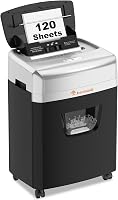
Bonsaii 120-Sheet Auto-Feed Micro-Cut Shredder
8.7/10 our score
See it on Amazon -
2
 Best for shared office use
Fellowes Powershred 99Ci 18-Sheet Jam-Proof Shredder
8.5/10 our score
See it on Amazon -
3
 Best for large paper backlogs
Bonsaii 200-Sheet Auto-Feed Micro-Cut Shredder
8.3/10 our score
See it on Amazon
- 4
 Check it
Bonsaii 18-Sheet Cross-Cut Shredder
Best for long manual sessions - 5
 Check it
Amazon Basics 200-Sheet Auto-Feed Cross-Cut Shredder
Best for routine file clearouts - 6
 Check it
Fellowes Powershred 79Ci 16-Sheet Jam-Proof Shredder
Best for shorter daily clearouts
How we chose the best heavy duty paper shredders
We compared feed capacity, work cycles, cooling breaks, cut size, supported materials and bin space. The ranking favors useful combinations for everyday office work, while the individual recommendations identify better fits for specific workloads.
The Bonsaii 120-sheet model leads for its balance of batch feeding and small manual jobs. It isn't the right choice for every heavy workload, especially if your main task is feeding paper by hand for long stretches.
We kept tray capacity separate from manual capacity. A stack loaded into an automatic tray passes through over time; it isn't equivalent to pushing that many sheets through the cutters at once.
All six picks have P-4 security. The two Bonsaii micro-cut models make smaller pieces than the cross-cut models here, but that doesn't change their stated security level.
Our micro-cut versus cross-cut comparison explains the practical differences. Choose the required level first, then decide which feed style and work cycle will let you finish the job.
| Product | Best for | Auto-feed capacity | Cut type | Bin | Our score |
|---|---|---|---|---|---|
| Bonsaii 120-Sheet Auto-Feed Micro-Cut Shredder | mixed office jobs | 120 sheets | Micro-cut, P-4 | 5.9 gallons | 8.7 |
| Fellowes Powershred 99Ci 18-Sheet Jam-Proof Shredder | shared office use | Cross-cut, P-4 | 9 gallons | 8.5 | |
| Bonsaii 200-Sheet Auto-Feed Micro-Cut Shredder | large paper backlogs | 200 sheets | Micro-cut, P-4 | 8.1 gallons | 8.3 |
| Bonsaii 18-Sheet Cross-Cut Shredder | long manual sessions | Cross-cut, P-4 | 6 gallons | 8.2 | |
| Amazon Basics 200-Sheet Auto-Feed Cross-Cut Shredder | routine file clearouts | 200 sheets | Cross-cut, P-4 | 8.5 gallons | 8.0 |
| Fellowes Powershred 79Ci 16-Sheet Jam-Proof Shredder | shorter daily clearouts | Cross-cut, P-4 | 6 gallons | 7.9 |
Which heavy duty paper shredder fits your workload?
Choose the Bonsaii 120-sheet model for mixed small-office duties, then move to another pick when your workload has a clear priority. Large paper stacks, varied materials and extended manual feeding each call for a different balance.
Heavy duty paper shredder picks for different buyers
Bonsaii 120-Sheet Auto-Feed Micro-Cut Shredder: Best for mixed office jobs
- 120-sheet auto feed
- 30-minute auto-feed run time
- P-4 micro-cut
- 5.9-gallon bin
A balanced choice for offices that batch loose paper and feed mail or supported cards separately. Its manual slot takes up to 12 sheets, but long manual sessions need a different model.
Pros
- Separate batch and manual feed options
- Smaller micro-cut pieces
- Pullout bin with casters
Cons
- Auto-feed tray accepts paper only
- Manual cycle is 10 minutes followed by 60 minutes off
The Bonsaii 120-sheet model suits an office that clears loose paper in batches and handles mail or supported cards separately. Its 12-sheet manual slot gives you a second route for items that don't belong in the paper-only tray.
Its main buying limit is the cooling schedule. Auto mode allows 30 minutes of work followed by 60 minutes off, while manual mode allows just 10 minutes before the same rest.
That makes it a good fit for planned disposal sessions with other work between them. Skip it if several people will bring documents throughout a long clearout and expect the manual slot to remain available.
The micro-cut pieces measure 4 x 12 mm, and the 5.9-gallon pullout bin sits on casters. Leave room to slide the bin out without moving the whole machine.
Bonsaii says shredding stops when the bin is about 80% full. Empty it when prompted rather than trying to extend the session by packing the scraps down.
Fellowes Powershred 99Ci 18-Sheet Jam-Proof Shredder: Best for shared office use
- 18-sheet manual capacity
- 30-minute run time
- P-4 cross-cut
- 9-gallon pullout bin
The largest bin in this group suits shared disposal duties. Support for staples, credit cards, paper clips, CDs/DVDs and junk mail makes it useful where incoming materials vary.
Pros
- Broad range of supported materials
- Largest bin among these picks
- SafeSense opening sensor
Cons
- Every batch requires manual feeding
- Larger pieces than the micro-cut picks
The Fellowes 99Ci fits a shared office where staff bring small bundles, junk mail and supported non-paper items throughout the day. Its manual feed handles up to 18 sheets per pass, with a maximum 30-minute work cycle.
The 9-gallon bin is the largest here, making this a useful choice when several people share emptying duties. The full indicator also gives users a clear reason to stop instead of feeding another bundle.
Supported materials include staples, credit cards, paper clips and CDs/DVDs. That range suits mixed disposal work better than buying mainly for a large paper tray.
Fellowes says SafeSense stops the cutters when hands touch the opening. Keep normal precautions in place, including keeping children, pets, loose clothing and hair away.
Choose the 99Ci for shared manual use and varied materials. Skip it if your recurring task is a tidy stack that could go into an auto-feed tray.
Our Bonsaii versus Fellowes comparison can help if you're choosing between the brands' different approaches.
Bonsaii 200-Sheet Auto-Feed Micro-Cut Shredder: Best for large paper backlogs
- 200-sheet auto feed
- 60-minute auto-feed run time
- P-4 micro-cut
- 8.1-gallon bin
Choose this for recurring stacks of letter-size office paper and smaller cut pieces. Its separate manual entry also handles supported cards, staples and paper clips.
Pros
- Large batch tray with a long auto-feed cycle
- 30-minute manual run time
- Includes 12 lubricant sheets
Cons
- Auto feed requires suitable letter-size paper
- Manual passes are limited to 12 sheets
The Bonsaii 200-sheet micro-cut model is the better fit for recurring backlogs of standard office paper. Its automatic tray accepts letter-size, 20 lb paper, so check your document stock before choosing it for an archive.
Auto mode runs for up to 60 minutes, while the separate manual entry has a 30-minute limit. That longer manual cycle gives it more flexibility than the smaller Bonsaii auto-feed pick when occasional mixed jobs grow.
The manual slot accepts 12 sheets or supported credit cards, staples and paper clips. Keep those non-paper items out of the automatic tray.
Its 8.1-gallon pullout bin and four wheels suit a shared work area with a designated shredding spot. Bonsaii specifies operation at 58 dB or less, though placement and the documents being fed still matter to nearby workers.
Choose it when both stack capacity and smaller cut pieces matter. Skip it if most of your workload consists of irregular documents that need individual attention, since you'd be buying a large tray you rarely use.
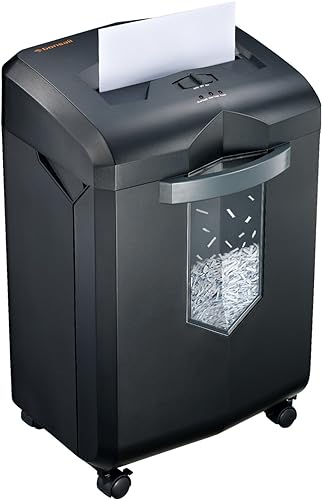
Bonsaii 18-Sheet Cross-Cut Shredder: Best for long manual sessions
- 18-sheet manual capacity
- Up to 60-minute run time
- P-4 cross-cut
- 6-gallon pullout bin
A strong fit for people who sort and feed documents throughout a long clearing session. Bonsaii specifies a 10-minute cooling break after the continuous run cycle.
Pros
- Long manual work cycle
- Auto-reverse and overload protection
- Pullout basket with a viewing window
Cons
- No stack-loading tray
- Smaller bin than the larger batch models
The Bonsaii 18-sheet cross-cut model suits long manual sessions where you review each bundle before disposal. Bonsaii rates it for up to 60 minutes of shredding followed by a 10-minute cooling break.
That schedule makes it a strong match for clearing folders while separating records to keep. You can feed documents as you sort rather than preparing a whole tray in advance.
It accepts up to 18 sheets of letter-size, 20 lb paper per pass and supports staples and credit cards. The 6-gallon basket has a viewing window, so include emptying stops in a long job.
Auto-reverse, overload protection and overheating protection help manage feeding problems. They don't make oversized bundles suitable, and a protective stop is a reason to correct the load.
Choose this model for sustained manual work. Skip it if your goal is to reduce repeated trips to the feed slot.
If paper stops moving, follow our guide to clearing a paper shredder jam rather than forcing another bundle through.
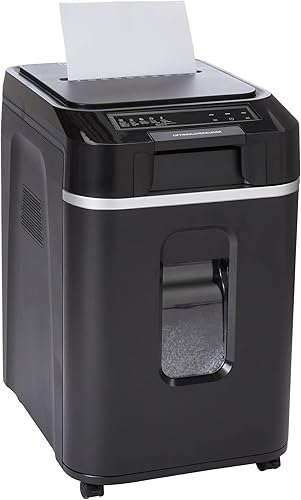
Amazon Basics 200-Sheet Auto-Feed Cross-Cut Shredder: Best for routine file clearouts
- 200-sheet auto feed
- 60-minute auto-feed run time
- P-4 cross-cut
- 8.5-gallon bin
A batch-first choice for loose paper when cross-cut output meets your disposal rules. Status lights identify feed errors, a full bin, an open door, overload and overheating.
Pros
- Large paper tray and waste bin
- Staples can remain in paper
- Auto-reverse and status indicators
Cons
- Manual slot takes only 10 sheets
- Both feed modes require a 45-minute cooling break
The Amazon Basics 200-sheet model suits routine file clearouts where prepared paper stacks and cross-cut output meet your needs. Its automatic cycle runs for up to 60 minutes before a 45-minute cooling break.
The manual slot is for smaller follow-up jobs, with a 10-sheet limit and 10-minute cycle. It requires the same cooling interval, so this is a batch-first choice rather than a long-session manual machine.
Staples can remain in paper, which reduces one preparation task. Still separate documents that you must retain and remove materials the manual doesn't allow before loading the tray.
Its 8.5-gallon pullout bin is backed by lights for feed error, bin full, door open, overload and overheating. Use the relevant indicator to identify the next step instead of repeatedly restarting the machine.
Choose it when a large tray, substantial bin and cross-cut output fit your routine. Choose the Bonsaii 200-sheet model instead if smaller pieces or a longer manual work cycle matter more.
Fellowes Powershred 79Ci 16-Sheet Jam-Proof Shredder: Best for shorter daily clearouts
- 16-sheet manual capacity
- 20-minute run time
- P-4 cross-cut
- 6-gallon pullout bin
A manual-feed option for daily document disposal rather than extended archive clearing. It supports the same range of materials as the larger Fellowes pick, with a shorter work cycle.
Pros
- Handles paper and supported mixed materials
- SafeSense opening sensor
- Bin-full indicator
Cons
- Shorter run cycle than the other manual picks
- No auto-feed tray
The Fellowes 79Ci fits shorter daily clearouts involving paper, junk mail and supported cards or discs. Its 16-sheet manual capacity and 20-minute run cycle suit regular disposal better than a long archive-clearing session.
It handles staples, paper clips, credit cards and CDs/DVDs. That makes it useful for a mixed incoming pile, provided you follow the manual's instructions for each material.
The 6-gallon pullout bin has a full indicator. Fellowes also includes SafeSense, which stops shredding when hands touch the paper opening.
Choose it when you want manual control and broad material support without needing the larger Fellowes model's bin. Skip it if you routinely have enough documents to fill an auto-feed tray or expect extended feeding sessions.
The 99Ci is the better match when several users share the machine and emptying interruptions matter. The Bonsaii long-run manual pick deserves more attention when work-cycle length is your main concern.
For a lighter manual workload, read our Bonsaii 12-sheet cross-cut shredder review.
How much capacity does your shredding routine need?
Choose capacity around a normal disposal session, then account for occasional backlogs separately. A machine sized only for an annual clearout may take more space than your daily work needs.
Before buying, sort a representative pile into loose office paper, awkward paper items and supported non-paper materials. This reveals whether tray loading would save effort or simply add another preparation step.
Choose auto feed for prepared paper stacks
Auto feed works best when you can prepare suitable paper together. Check paper size, weight, condition and tray-loading instructions rather than assuming every item from a filing cabinet belongs in the stack.
Flatten loose sheets and remove bindings or plastic covers that the machine doesn't accept. Keep documents you still need well away from the loading area.
Choose manual feed for sorting as you go
Manual feed suits piles that need a decision on each document. It also lets you handle supported materials through the correct entry without mixing them into a paper tray.
Treat the sheet limit as a ceiling, not a target for every pass. Folded sheets add layers, and heavier paper may require a smaller bundle.
Our guide to shredder sheet capacity explains how to turn those limits into sensible feeding habits.
How do run time and cooling breaks affect a large job?
Plan around the full work-and-rest cycle, not just the longest run-time number. A shredder that finishes one batch may still be unavailable when the next person arrives with documents.
Auto-feed and manual cycles can differ sharply on the same machine. Check the mode you'll actually use most, especially if you expect to feed assorted documents by hand.
Schedule work around required cooling
Prepare the next stack, sort retained records or arrange waste disposal during a cooling break. Don't keep restarting a machine that has stopped for heat protection.
A larger tray doesn't guarantee that the whole disposal job will finish before you need to intervene. Bin capacity, paper preparation and feed errors can all introduce stops.
Separate occasional backlogs from daily demand
For one large clearout, spreading work across planned sessions may be enough. Recurring large jobs justify more attention to cooling intervals and sustained manual capacity.
If several people share the shredder, assign a clear point for stopping and emptying. A long run cycle won't help when everyone assumes someone else will deal with a full basket.
Does a bigger bin make a shredder more useful?
A larger bin reduces emptying interruptions, but easy access matters just as much as capacity. Measure the space for the machine, the open tray and the fully extended wastebasket.
Leave room to empty and load it
A shredder that fits under a desk may still be awkward to use there. Check whether the desk blocks the loading cover or forces you to move the machine whenever the basket needs emptying.
For a wheeled model, use a level position where it won't roll into a walkway. Keep the power cord clear of the basket's path and nearby chairs.
Empty before waste crowds the cutters
Stop when the full indicator activates or scraps approach the bin's allowed fill level. Don't press shredded paper upward into the cutting area to gain more room.
Switch off and unplug before reaching into the basket area. Keep paper waste separate from shredded cards or discs where local disposal rules require different handling.
Bin capacity also isn't a promise about a fixed number of documents. Paper thickness, cut size and how loosely scraps settle all affect how quickly the basket fills.
Is P-4 security enough for office shredding?
Your document policy decides whether P-4 is suitable. All six machines share that level, so this roundup doesn't offer a higher-level alternative for records that require one.
Micro-cut and cross-cut describe the output, but those names alone aren't a complete security decision. In this group, the micro-cut pieces are smaller while remaining within the same stated level.
Read our P-4 versus P-5 guide if your workplace needs a different level. Check any written disposal requirements before choosing a machine for employee, client or other sensitive records.
Decide what belongs in the disposal pile
Separate records to retain before starting the shredder. Feeding a large stack is easier than recovering a document you meant to keep.
Our guide to what documents you should shred at home helps with routine household sorting. Business records may follow different retention rules, so use the policy that applies to your work.
Keep the waiting pile in a controlled spot, too. A suitable cut size only helps after the documents reach the cutters.
How should you set up a heavy duty paper shredder?
Set it up with clear loading access, ventilation and a safe power connection before preparing the first large batch. Follow the model's assembly instructions, including any basket, head or caster steps.
Check the space and controls first
Place the machine on a stable, level surface with its vents clear. Keep it away from liquids and allow the clearance required by the manual.
Locate the off switch, reverse control and status indicators before loading paper. Seat the basket fully, since an open bin or door can prevent operation.
Begin with a small, suitable load
Start with a few ordinary sheets through the correct entry. Confirm that paper feeds normally and waste falls into the basket before moving to a larger batch.
Keep hands away from the opening, and secure loose hair, sleeves, ties and jewelry. Don't leave a running shredder accessible to children or pets.
Keep aerosols away from the machine. Metallic credit cards don't belong in these shredders, and permission to shred ordinary credit cards doesn't extend to every type of card.
How do you keep a heavy duty shredder ready for large jobs?
Keep the cutters maintained, the bin clear and the feed load sensible. Follow the model's lubrication instructions, since the suitable method and schedule can differ.
Use the correct lubricant and cleaning method
Choose shredder oil or lubricant sheets only as directed for your machine. Household spray lubricants and improvised substitutes aren't a sound replacement for the specified method.
Our guide on how to oil a paper shredder covers the process. The oil versus lubricant sheets comparison helps you understand the two care options.
Switch off and unplug before removing loose scraps from accessible areas as the manual directs. Never reach between cutters or use your fingers to push paper through.
Reduce the load when feeding becomes uneven
If paper slows, skews or bunches, stop adding more. Let the current load clear, then check the basket and reduce the next bundle.
Repeated jams call for a cause check rather than repeated reversing. Our guide to why paper shredders keep jamming covers feeding, waste buildup and paper condition.
Which mistakes make heavy shredding take longer?
The biggest delays come from overloading, using the wrong feed mode and ignoring stop signals. Avoiding those mistakes usually saves more effort than trying to run every pass at maximum capacity.
Loading every material into the automatic tray
An auto-feed tray is designed around specific paper requirements. Use the manual entry for supported cards or other permitted items, following its separate instructions.
Don't assume a stapled packet, folded letter or unusual sheet size can go through the tray because the manual slot accepts it. Mode-specific limits matter.
Treating protection features as permission to overload
Jam prevention, auto-reverse and thermal shutoff are safeguards. They don't expand the permitted sheet count or remove the need for cooling.
If an overload warning appears, reduce the bundle. If an overheat warning appears, allow the required rest rather than repeatedly switching the machine back on.
Buying around an exceptional job
A large automatic tray is useful only if you regularly prepare suitable stacks. For mostly daily mail and mixed small bundles, a manual machine may match your work more closely.
Likewise, a short manual cycle becomes a poor fit when every disposal session is lengthy. Choose around the task you repeat, then plan how you'll handle the occasional larger pile.
Which heavy duty paper shredder should you choose?
The best heavy duty paper shredder is the one that matches your repeated workload. Choose the Bonsaii 120-sheet model for mixed small-office jobs when its longer cooling breaks fit your schedule.
Pick the Fellowes 99Ci for shared manual use, varied supported materials and fewer bin-emptying interruptions. Choose the Bonsaii 200-sheet micro-cut model for recurring stacks of suitable office paper.
For long sessions of sorting and manual feeding, choose the Bonsaii 18-sheet cross-cut model. Its work-and-rest schedule fits that task more closely than the smaller auto-feed model's manual cycle.
The Amazon Basics model suits routine paper clearouts where cross-cut meets your needs. The Fellowes 79Ci fits shorter daily disposal sessions with a mix of supported materials.
Before ordering, settle 3 points: what you'll feed, how long you'll feed it and where you'll empty it. If prepared stacks dominate your work, compare our best auto-feed paper shredder picks next.
Our top 3 picks at a glance
-
1
Best for mixed office jobs
Bonsaii 120-Sheet Auto-Feed Micro-Cut Shredder
8.7/10 our score
See it on Amazon -
2
Best for shared office use
Fellowes Powershred 99Ci 18-Sheet Jam-Proof Shredder
8.5/10 our score
See it on Amazon -
3
Best for large paper backlogs
Bonsaii 200-Sheet Auto-Feed Micro-Cut Shredder
8.3/10 our score
See it on Amazon
Frequently asked questions
What makes a paper shredder heavy duty?
A useful heavy duty paper shredder combines enough capacity, run time and bin space for your workload. The label alone doesn't define a work cycle or security level.
Compare the manual and automatic limits separately, then include cooling breaks and emptying time when planning a large document clearout.
Is auto feed or manual feed better for heavy shredding?
Auto feed is better for prepared stacks of suitable paper, while manual feed suits documents that need sorting and supported non-paper items. A tray capacity doesn't apply to the manual slot.
Choose around your usual material, since preparing an uneven stack can take away much of auto feed's convenience.
Is micro-cut better than cross-cut for office documents?
Micro-cut makes smaller pieces in this group, but all six picks have a P-4 security level. Your office's disposal policy should decide whether that level is suitable.
Choose the required security level first, then compare workflow and capacity; our micro-cut shredder guide explains the cut style.
How long can a heavy duty shredder run?
These models offer maximum work cycles from 10 to 60 minutes, depending on the machine and feed mode. An auto-feed model can have a much shorter manual cycle.
Check both the run limit and cooling interval before buying, and stop as directed rather than waiting for thermal protection to activate.