Bonsaii 12-Sheet Cross-Cut Shredder Review: Worth It? (October 2026)
The Bonsaii 12-sheet cross-cut paper shredder suits routine home office batches with its pullout bin and support for paper, staples, CDs and credit cards. Choose Fellowes for longer sessions and a safety lock, or Amazon Basics for smaller paper particles.
On this page (9 sections)
- Who should buy the Bonsaii 12-sheet cross-cut paper shredder?
- What does its P-4 cross-cut mean for your documents?
- How much paper can you clear in one session?
- Will the pullout bin suit your workspace?
- What can go into the Bonsaii besides paper?
- How do the Fellowes and Amazon Basics alternatives compare?
- How should you set up the Bonsaii before the first batch?
- How do you care for it and avoid common mistakes?
- Which shredder should you choose?
The Bonsaii 12-sheet cross-cut paper shredder is a sensible choice for routine household paperwork and home office batches. Choose it when you want a pullout bin and occasional card or CD disposal alongside paper shredding.
Its main limits are session length and particle size. Fellowes offers a longer continuous run and a safety lock, while Amazon Basics cuts paper into smaller fragments.
The right choice depends on your workload: a few envelopes each day, a weekly stack of records or a cupboard full of old files. Start with that pattern rather than choosing by sheet capacity alone.
Who should buy the Bonsaii 12-sheet cross-cut paper shredder?
Buy the Bonsaii for regular, manageable batches that you can feed by hand. Skip it if your main job is clearing a large archive or meeting a security rule above P-4.
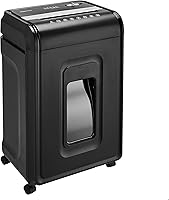
Bonsaii 12-Sheet Cross-Cut Shredder: Best for routine home paperwork

- 12 sheets per pass
- P-4 cross-cut
- 15-minute run time
- 5.5-gallon pullout bin
A practical choice for recurring household paperwork and home office batches. The pullout bin has a viewing window, and manual reverse helps you back out stuck paper.
Pros
- Pullout bin with a transparent window
- Handles staples, CDs and credit cards
- Manual reverse function
- Stops when the wastebasket is pulled out
Cons
- Shorter continuous run time than either alternative
- Larger paper particles than the Amazon Basics model
- Cannot shred metallic credit cards
The C282-A fits someone who sorts household statements, home office paperwork and expired records into a small pile, then shreds them in one sitting. Its viewing window helps you check the waste level before starting.
A pullout basket also suits a shredder kept beside a desk or storage cabinet. Leave clear space in front so emptying it doesn't require moving furniture.
When is the Bonsaii 12-sheet cross-cut shredder a poor fit?
Choose another type if you want to load a stack and leave the machine to feed itself. This model's batch capacity doesn't remove the need to stand nearby and feed paper.
For that workflow, compare our best auto feed paper shredders. Auto feed changes how you spend your time, which can matter more than adding a few sheets to each manual pass.
Also skip this Bonsaii if a workplace policy requires a finer security level. A convenient home office machine still needs to match the rules for the documents you handle.
What does its P-4 cross-cut mean for your documents?
The Bonsaii cuts paper into 5 x 25 mm particles at P-4 security level. That gives you a defined security reference rather than relying on the words “cross-cut” alone.
P-4 can suit personal paperwork when no stricter destruction rule applies. For business, client or regulated records, check the required level before putting this model on your shortlist.
Our guide to paper shredder security levels explains how to compare those requirements. Smaller-looking fragments and a higher security level aren't always the same thing.
Keep disposal habits in mind, too. Store documents securely before shredding and don't leave an unshredded pile beside a shared wastebasket while waiting for your next session.
How much paper can you clear in one session?
The Bonsaii accepts up to 12 sheets of 20 lb letter paper per pass and runs continuously for up to 15 minutes. Sheet capacity controls each feed; run time controls how long the motor can keep working.
Bonsaii estimates about 900 sheets during a full session. Use that as a brand estimate, with time also needed to sort papers, feed each stack and empty the basket.
Treat the sheet limit as a ceiling rather than a target for every pass. Thick paper, folded sheets and mixed stacks call for smaller feeds because sheet count alone doesn't describe their bulk.
For daily mail, sorting and feeding may take more time than the shredding itself. For a box of old records, the operating cycle becomes a much bigger part of the job.
Don't assume an empty bin means the machine is ready for another full run. Follow the manual's cool down directions, and plan archive clearouts in separate batches rather than one long push.
Our shredder sheet capacity guide helps you judge how much capacity your normal paperwork needs.
Will the pullout bin suit your workspace?
The Bonsaii's 5.5-gallon pullout bin suits batch shredding without requiring you to lift off the cutter head to empty it. Bonsaii estimates that it holds the shreds from about 350 sheets of A4 paper.
That estimate won't translate directly to every mix of documents. Check the transparent window during a long batch instead of counting pages until you reach a fixed total.
The unit has casters, and it stops working when the wastebasket is pulled out. Seat the bin fully before use so a partly open basket doesn't interrupt the job.
Choose a spot with room for the bin to slide clear and for you to lift the waste into a disposal container. A tight gap under a desk can make an otherwise convenient basket awkward to empty.
Don't press shreds down into the cutter area to make more room. Stop, unplug the machine and empty the basket before packed waste interferes with normal use.
What can go into the Bonsaii besides paper?
The Bonsaii accepts staples, CDs and credit cards, but it must not take metallic credit cards. Follow its manual for the correct feed method for each material.
Don't extend that permission to every small office item. Remove binder clips, plastic sleeves, adhesive labels and other materials unless the manual specifically allows them.
Paper clips and unopened junk mail are supported by the Fellowes alternative, but that doesn't establish permission to put them through the Bonsaii. Each machine has its own material limits.
Sort unfamiliar envelopes before feeding them so you don't accidentally include a plastic card, thick insert or another object. Opening mail also helps you separate records you need to keep from paper ready for disposal.
Manual reverse can help back paper out of a feed problem, but it can't restore a document already cut. Make the keep-or-shred decision before bringing the stack to the slot.
How do the Fellowes and Amazon Basics alternatives compare?
Choose Fellowes for its safety lock and longer sessions, or Amazon Basics for smaller fragments and the largest bin here. All 3 accept the same maximum number of paper sheets per pass.
| Detail | Bonsaii | Fellowes | Amazon Basics |
|---|---|---|---|
| Cut type | Cross-cut, P-4 | Cross-cut, P-4 | Micro-cut, P-4 |
| Particle size | 5 x 25 mm | 5/32 x 1-9/16 in | 5.1 x 12.7 mm |
| Sheets per pass | Up to 12 | Up to 12 | Up to 12 |
| Bin capacity | 5.5 gallons | 5 gallons | 6 gallons |
| Continuous run | Up to 15 minutes | Up to 20 minutes | 20 minutes |
| Cool down | Follow the manual | Required after maximum run | 20 minutes |
Fellowes: choose it for shared spaces and mixed mail
The Fellowes is the stronger fit if disabling the shredder between uses matters to your household. Its Safety Lock provides that function, though careful placement and supervision still matter.
Fellowes Powershred 12-Sheet Cross-Cut Shredder: Best for shared home offices

- 12 sheets per pass
- P-4 cross-cut
- 20-minute run time
- 5-gallon pullout bin
Choose this cross-cut alternative when a safety lock and longer sessions matter most. It also accepts paper clips and unopened junk mail.
Pros
- Safety lock disables the shredder between uses
- Longer continuous run time than the Bonsaii
- Handles staples, paper clips, credit cards and unopened junk mail
Cons
- Smallest bin of these 3 models
- Needs a cool down period after its maximum continuous run
It accepts staples, paper clips, credit cards and unopened junk mail. That material range suits a mail-sorting station where removing every small fastener would slow the routine.
Check unfamiliar envelopes for unsupported contents and allow for folded paper when judging a feed. Permission to shred unopened mail doesn't mean every thick packet should go through in one pass.
Skip the Fellowes if you mainly want fewer bin-emptying stops or smaller paper fragments. Its basket is the smallest of these choices, and the Amazon Basics model better fits the latter preference.
Amazon Basics: choose it for smaller paper fragments
The Amazon Basics is the better fit if shorter fragments are your priority within this group. Its micro-cut output still shares the same security level as the cross-cut choices.
Amazon Basics 12-Sheet High-Security Micro-Cut Shredder: Best for detailed personal records

- 12 sheets per pass
- P-4 micro-cut
- 20-minute run time
- 6-gallon pullout bin
Choose this model when you prefer smaller paper fragments and a larger waste bin. Status lights help you identify overload, overheating, a full bin or an open door.
Pros
- Smaller paper particles than the Bonsaii
- Largest bin of these 3 models
- Casters for moving the unit
- Separate overload, overheat, bin-full and door-open indicators
Cons
- Cool down period matches its continuous run time
- CDs, DVDs and credit cards must be fed one at a time
Its controls include power/auto, forward and reverse, with separate indicators for overload, overheating, a full bin and an open door. Those lights help you distinguish a feed problem from a bin or operating-cycle issue.
It handles staples and small paper clips, plus CDs, DVDs and credit cards fed one at a time. Casters help you move it between its storage spot and an area with room to empty the basket.
Skip it if you need near-continuous work through a large backlog. Its cool down lasts as long as its full operating cycle, so a bigger basket doesn't remove the need for breaks.
For more choices, see our best cross-cut paper shredders. Our Bonsaii vs Fellowes shredder comparison helps if you're still deciding between those brands.
How should you set up the Bonsaii before the first batch?
Set it on a stable, level surface with access to the controls, paper slot and wastebasket. Read the C282-A manual before connecting power or feeding any material.
Keep the feed opening clear of loose cables, clothing and other objects. Position the machine where children and pets can't reach it during use.
With power disconnected, check that packaging has been removed as directed and the basket is seated properly. Keep the area around the machine clear so you can stop it without reaching over a paper pile.
Sort your first batch into paper, approved non-paper items and documents to retain. Begin with a small, straight stack rather than a full-capacity feed while you learn the controls.
Feed paper squarely and let the machine draw it through. Pushing down hard or adding another stack before the first clears increases the chance of a feed problem.
How do you care for it and avoid common mistakes?
Use manual-approved care methods, empty the basket before it becomes packed and reduce feed size when paper struggles to pass. Do not spray or store aerosol products in or around the shredder.
Use the correct lubricant
Follow the C282-A manual for lubricant type, application method and frequency. Don't substitute household spray oil or assume every lubricant sheet is suitable for every shredder.
Our paper shredder oiling guide explains the general process. Read shredder oil versus lubricant sheets if you're choosing between options the manual permits.
Stop forcing a difficult feed
If paper stalls, stop adding more and use manual reverse as directed. Repeatedly pushing the same thick stack into the slot can make the blockage worse.
Reduce the stack after backing it out. Our guide to clearing a paper shredder jam covers the next steps if reverse doesn't solve the problem.
Disconnect power before reaching near the cutter area or attempting cleaning. Keep fingers and tools out of the feed opening, and follow the manual's troubleshooting steps.
Don't confuse a pause with a fault
A full basket, poorly seated bin or required cooling break can interrupt shredding. Check the machine's operating directions before assuming the motor has failed.
Avoid repeated restarts when the machine needs to cool. Plan the next batch during the break by removing unsupported items and separating papers you still need.
Which shredder should you choose?
Choose the Bonsaii 12-sheet cross-cut paper shredder when routine home paperwork is your main task and you can stay nearby to feed it. Its bin window and pullout basket fit a regular sort, shred and empty routine.
Pick Fellowes when the safety lock and permission to handle paper clips and unopened mail better match your workspace. Pick Amazon Basics when smaller fragments and a larger basket matter most.
For a large archive, decide whether you need auto feed or a longer operating cycle before choosing among these models. That workload calls for a different buying decision than clearing the week's household mail.
If the Bonsaii fits your routine but you want to compare other models from the brand, continue with our Bonsaii paper shredder guide.
Frequently asked questions
Is the Bonsaii 12-sheet cross-cut shredder P-4?
Yes, the Bonsaii C282-A has a P-4 security level and cuts paper into 5 x 25 mm particles. All 3 models compared here meet P-4, even though their cut shapes differ.
If your workplace sets document destruction rules, match those rules before choosing by bin size or run time.
How long can the Bonsaii 12-sheet shredder run?
Bonsaii specifies up to 15 minutes of continuous use and estimates about 900 sheets during that period. Actual batch planning should account for sorting, feeding and emptying the bin, so don't treat that estimate as a guaranteed session total; follow the manual for cool down directions before starting again.
Can the Bonsaii 12-sheet shredder handle credit cards and CDs?
Yes, the Bonsaii accepts CDs, credit cards and staples, but metallic credit cards must stay out. Follow the manual's feeding directions for each material rather than treating every opening like the paper slot, and keep aerosol products away from the shredder during both use and storage.
How does the Bonsaii compare with a micro-cut shredder?
The Amazon Basics alternative makes shorter paper fragments than the Bonsaii, but both models meet P-4. A micro-cut label doesn't automatically mean a higher security level, so compare the actual cut and any required standard; our guide to micro-cut versus cross-cut shredders explains the differences.