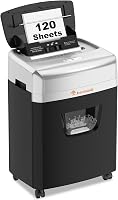
6 Best Auto Feed Paper Shredders (October 2026)
The best auto-feed paper shredders include the Bonsaii 120-Sheet Auto-Feed Micro-Cut Shredder for routine home paperwork, the Bonsaii 200-Sheet Auto-Feed Micro-Cut Shredder for large office batches, and the Aurora AU110MB 110-Sheet Auto-Feed Shredder for tight workspaces.
On this page (9 sections)
- Which best auto feed shredder pick fits your workload?
- How should you choose tray capacity and run time?
- When is automatic feeding worth the extra space?
- How much space and bin capacity do you need?
- Is P-4 micro-cut right for your documents?
- How do you set up and load an auto feed shredder?
- What care prevents avoidable feed problems?
- Which mistakes make automatic shredding harder?
- Which best auto feed shredder should you choose?
The Bonsaii 120-Sheet Auto-Feed Micro-Cut Shredder is the best auto feed shredder for most home offices because it balances batch capacity, waste storage and a separate manual entry. Choose the larger Bonsaii for bigger stacks or the compact Aurora AU110MB when floor space is tight.
Auto feed is most useful when your shredding pile consists of sorted, flat paper. It reduces repeated hand feeding, but you still need to prepare the stack, check the bin and respect cooling breaks.
If you are comparing cut types, our best micro-cut paper shredders roundup covers models beyond automatic feeding. For a closer look at the larger Bonsaii, see the Bonsaii 200-sheet auto-feed review.
Our picks at a glance
-
1
 Best for routine home paperwork
Bonsaii 120-Sheet Auto-Feed Micro-Cut Shredder
8.7/10 our score
See it on Amazon -
2
 Best for large office batches
Bonsaii 200-Sheet Auto-Feed Micro-Cut Shredder
8.3/10 our score
See it on Amazon -
3
 Best for tight workspaces
Aurora AU110MB 110-Sheet Auto-Feed Shredder
7.9/10 our score
See it on Amazon
- 4
 Check it
Aurora AU120MA 120-Sheet Auto-Feed Shredder
Best for shared home offices - 5
 Check it
Aurora AU120MB 120-Sheet Auto-Feed Shredder
Best for visible office corners - 6
 Check it
Amazon Basics 150-Sheet Auto-Feed Micro-Cut Shredder
Best for extended filing cleanouts
Which best auto feed shredder pick fits your workload?
Choose around your normal paper pile, rather than the largest backlog you have ever collected. A home office with regular stacks needs a different balance of tray space, cooling time and floor space than an office clearing several folders at once.
We compared automatic capacity, run schedules, bin volume, security level and manual-feed options. The order favors a useful home-office fit, while the larger machines address heavier batch work.
| Product | Best for | Auto-feed capacity | Run time | Bin | Our score |
|---|---|---|---|---|---|
| Bonsaii 120-Sheet Auto-Feed Micro-Cut Shredder | routine home paperwork | 120 sheets | 30 min on, 60 min off in auto mode | 5.9 gal | 8.7 |
| Bonsaii 200-Sheet Auto-Feed Micro-Cut Shredder | large office batches | 200 sheets | Up to 60 min in auto mode | 8.1 gal | 8.3 |
| Aurora AU110MB 110-Sheet Auto-Feed Shredder | tight workspaces | 110 sheets | 30 min | 4 gal | 7.9 |
| Aurora AU120MA 120-Sheet Auto-Feed Shredder | shared home offices | 120 sheets | 30 min | 5 gal | 7.8 |
| Aurora AU120MB 120-Sheet Auto-Feed Shredder | visible office corners | 120 sheets | 30 min | 5 gal | 7.6 |
| Amazon Basics 150-Sheet Auto-Feed Micro-Cut Shredder | extended filing cleanouts | 150 sheets | 60 min on, 45 min off in auto mode | 8.5 gal | 7.4 |
Our best auto feed shredder for routine paperwork
The Bonsaii 120-sheet model suits a household or solo office that clears paperwork regularly. Its 120-sheet tray and 5.9-gallon pullout bin provide a middle ground between the compact Aurora and the larger office models.
Bonsaii 120-Sheet Auto-Feed Micro-Cut Shredder: Best for routine home paperwork
- 120-sheet automatic capacity
- 30 minutes on, 60 minutes off in auto mode
- P-4 micro-cut
- 5.9-gallon bin
A balanced choice for recurring home-office stacks, with a pullout bin and casters. Keep mixed mail and allowed cards for the manual slot.
Pros
- Separate automatic and manual feeds
- Bin window and automatic full-bin stop
- Pullout bin and casters
Cons
- Automatic tray accepts paper only
- Long cooldown between sustained sessions
Automatic mode runs for 30 minutes, followed by 60 minutes off. The manual entry handles up to 12 sheets, with a separate 10-minute run and the same cooling break.
Keep the automatic tray for paper; use the manual entry for allowed mail, cards and staples. That split works well if you sort a pile into ordinary documents and a smaller group of awkward items before starting.
A transparent bin window helps you see the waste level, and the machine stops when the bin is about 80% full. Empty it when prompted instead of packing the scraps down to keep shredding.
Choose this model for a recurring desk-clearing routine that leaves time between sessions. Skip it if several people need to run back-to-back batches, since the long cooling break can interrupt that workflow.
Bonsaii's larger tray for office batches
The Bonsaii 200-sheet model suits offices that regularly collect thick stacks of standard documents. Its 200-sheet automatic tray reduces reloads, while an automatic run of up to 60 minutes gives larger jobs more room.
Bonsaii 200-Sheet Auto-Feed Micro-Cut Shredder: Best for large office batches
- 200-sheet automatic capacity
- Up to 60 minutes continuous run in auto mode
- P-4 micro-cut
- 8.1-gallon bin
The largest automatic tray here suits offices that collect substantial stacks between shredding sessions. A separate manual entry handles allowed cards and fasteners.
Pros
- Largest automatic tray here
- Long automatic and manual run times
- Includes 12 lubricant sheets
Cons
- Automatic mode requires letter-size paper
- Large body needs a dedicated floor space
Automatic feeding is for letter-size paper, specifically 8.5 by 11 inches at 20 lb. The separate manual entry takes up to 12 sheets, accepts credit cards, staples and paper clips, and has a 30-minute continuous run.
The 8.1-gallon bin helps keep waste collection in step with the larger tray. Bonsaii says it holds roughly 700 sheets of shredded paper, though you should empty it according to the machine's fill guidance.
The body measures 15.9 inches deep, 13.8 inches wide and 22.2 inches tall. Four wheels help with repositioning, but its 33.9 lb weight makes a permanent floor location more practical than carrying it between rooms.
Choose it for frequent office batches with consistent paper size. Skip it for a few daily receipts or a mixed pile that needs mostly manual feeding; the larger tray adds little value to those jobs.
Aurora's compact choice for tight spaces
The Aurora AU110MB is the clearest choice when physical size limits your options. At 8.7 inches deep, 13.4 inches wide and 18.8 inches tall, it is smaller in every dimension than the other picks.
Aurora AU110MB 110-Sheet Auto-Feed Shredder: Best for tight workspaces
- 110-sheet automatic capacity
- 30-minute continuous run
- P-4 micro-cut
- 4-gallon pullout bin
The smallest body in this group fits offices where floor space matters more than waste capacity. Status lights help identify common reasons for a pause.
Pros
- Smallest dimensions among these picks
- Casters included
- Auto reverse and overload protection
Cons
- Smallest bin requires more frequent emptying
- Less tray capacity than the other picks
Its 110-sheet automatic capacity suits a modest sorted stack, and it has a 30-minute continuous run. The manual entry accepts up to 10 sheets, and the machine can also shred credit cards using Aurora's specified feed method.
The 4-gallon pullout basket is the tradeoff for that smaller body. It suits someone who empties the shredder as part of a regular routine better than someone hoping to process a large filing backlog with few stops.
Automatic start and stop, auto reverse and overload protection support everyday operation. Lights identify feed errors, a full bin, an open door, overload and overheating, so check the indicated cause before adding more paper.
Choose it for a narrow office corner or limited space beside a desk. Skip it if frequent bin trips would discourage you from finishing the job, even when the tray itself is large enough.
Aurora AU120MA for a shared home office
The Aurora AU120MA fits a home office where people share the machine and need clear status information between jobs. Its black finish and middle-size capacity make it a straightforward alternative to the smaller AU110MB.
Aurora AU120MA 120-Sheet Auto-Feed Shredder: Best for shared home offices
- 120-sheet automatic capacity
- 30-minute continuous run
- P-4 micro-cut
- 5-gallon pullout bin
A middle-size Aurora for households sharing one shredder and checking its status between jobs. Choose it when you prefer a black finish over the similar AU120MB.
Pros
- Clear operating-status lights
- Automatic start and stop
- Auto reverse and overload protection
Cons
- Manual slot takes fewer sheets than either Bonsaii
- Less waste capacity than the larger models
It combines a 120-sheet automatic tray, a 5-gallon pullout bin and a 30-minute continuous run. The manual slot handles up to 10 sheets, and credit-card shredding is supported through the appropriate feed method.
Standby, bin-full, feed-error, door-open, overload and overheat lights help explain why the machine is ready or paused. That matters when one person starts a batch and another later finds the shredder stopped.
Automatic start and stop, auto reverse and overload protection are included. These features help manage interruptions, but a shared office still needs someone responsible for clearing the tray and emptying the bin.
Choose it when the compact Aurora feels too limited and a larger office machine takes more space than you want. Skip it if you need longer continuous sessions or expect a clear capacity advantage over the white and black AU120MB.
Aurora AU120MB for an office corner in view
The Aurora AU120MB suits buyers who want a white and black finish for a shredder that stays visible. Its main capacities match the AU120MA, so choose between them on appearance rather than expecting a larger workload allowance.
Aurora AU120MB 120-Sheet Auto-Feed Shredder: Best for visible office corners
- 120-sheet automatic capacity
- 30-minute continuous run
- P-4 micro-cut
- 5-gallon pullout bin
A white and black alternative to the AU120MA for a shredder that stays in view. Its main paper-handling capacities match the black model.
Pros
- White and black finish
- Operating-status lights
- Automatic start-stop and auto reverse
Cons
- No capacity increase over the AU120MA
- Not the choice for hour-long continuous sessions
It has a 120-sheet automatic tray, a 5-gallon pullout bin and a 30-minute continuous run. Manual capacity is 10 sheets, and the machine also supports credit-card shredding.
Automatic start-stop, auto reverse and overload protection cover the same core operating needs as the black model. Status lights show conditions including a full bin, feed error, open door, overload and overheating.
That makes it a sensible match for regular document batches in an office that doubles as a living space. Keep enough clearance around it for loading and emptying rather than choosing its location on appearance alone.
Skip this model if you need more capacity than the AU120MA provides. Neither Aurora gains a paper-handling advantage from its finish, and neither is the right fit when an hour-long continuous run is a firm requirement.
Amazon Basics for planned filing cleanouts
The Amazon Basics model suits longer paper-clearing sessions where waste capacity matters as much as tray capacity. Its 150-sheet automatic tray sits between the smaller home-office picks and the larger Bonsaii.
Amazon Basics 150-Sheet Auto-Feed Micro-Cut Shredder: Best for extended filing cleanouts
- 150-sheet automatic capacity
- 60 minutes on, 45 minutes off in auto mode
- P-4 micro-cut
- 8.5-gallon bin
A long automatic run and the largest bin here suit planned filing cleanouts. Its wide body needs room beside the desk and a clear path for emptying.
Pros
- Largest bin in this group
- Forward and reverse controls
- Accepts staples and small paper clips with paper
Cons
- Substantial cooldown after sustained operation
- Wide body is harder to fit beside furniture
Automatic mode runs for 60 minutes, followed by 45 minutes off. Manual mode accepts up to 10 sheets and runs for 10 minutes before the same cooling break.
The 8.5-gallon pullout bin is the largest here. Paper can retain staples and small paper clips, and the machine also destroys credit cards through the proper feed method.
A four-mode switch provides auto/on, off, reverse and forward controls. Auto reverse, status lights, sleep mode and casters round out the features for managing a longer job.
Allow for its 18.3-inch width before choosing a spot beside furniture. Pick it when you prepare cleanout sessions in advance and can accommodate the cooldown; skip it for cramped rooms or workloads dominated by repeated manual feeding.
How should you choose tray capacity and run time?
Choose tray capacity for one normal batch, then check whether the duty cycle supports the rest of your workload. A large tray saves reloads, while run time determines how long the machine may operate before cooling.
Count a real stack before choosing
Sort a typical pile into paper for automatic feeding and items that need separate handling. Count the automatic portion, since a stack of opened letters can be much smaller than the original pile of envelopes.
If that stack fits comfortably in a smaller tray, extra capacity may sit unused. If you regularly split it across several loads, a larger tray can reduce the number of times you return to refill it.
Capacity is a maximum under the model's paper requirements, not a target you must reach. Thicker sheets, folded paper and unsupported materials should never be treated as equivalent to ordinary flat sheets.
Separate loading convenience from processing speed
A higher sheet limit means you can load more paper at once. It does not establish faster shredding, and a longer run allowance does not tell you how quickly a full tray will finish.
For a time-sensitive job, leave room in your schedule for preparation, reloading, emptying and cooling. Do not assume a full tray will finish within a particular time based only on its capacity.
Check the complete duty cycle
Read the run allowance and the cooling requirement together. A machine that completes your stack before reaching its limit may suit you better than one with a longer cycle but a larger body you struggle to place.
Automatic and manual modes can have different schedules because they handle paper differently. A card or a handful of sheets through the manual slot still counts toward that mode's operating limits.
For several users, plan who shreds and when. If everyone needs the machine immediately after a long batch, a required cooling break becomes a shared-office bottleneck.
When is automatic feeding worth the extra space?
Automatic feeding is worth choosing when repeatedly feeding sorted stacks is your main chore. If most of your shredding consists of a few sheets at a time, a manual-feed machine may fit the job more simply.
Think about the paper you actually discard. Flat office documents suit batch loading better than a pile dominated by small receipts, sealed mail, labels, cards and unusual paper sizes.
Automatic feeding also does not remove your preparation work. You still need to separate records worth keeping, remove unsupported materials and arrange the paper according to the tray instructions.
If you shred only when a drawer fills up, changing the routine may help more than buying the biggest machine. A small weekly pile is easier to sort and less likely to turn into a long, interrupted cleanout.
How much space and bin capacity do you need?
Choose a location that allows loading, ventilation and full bin removal. The body's measurements are only the starting point, especially under a desk or beside a cabinet.
Measure the space above the machine for opening its feed cover. Check the path in front of the bin, too, so you can pull it out without moving a chair or unplugging other equipment.
A larger bin is useful when paper volume is high, but it also means a larger container to handle. Consider where you will empty it and how far you must carry the waste.
Casters help with short moves across a suitable floor. They do not make a heavy shredder convenient to lift over thresholds, carry upstairs or store on a shelf.
Keep the machine somewhere you will use it consistently. A shredder buried behind furniture can turn a short privacy task into another growing stack of paperwork.
Is P-4 micro-cut right for your documents?
All 6 picks provide P-4 micro-cut output, so security level is not the main distinction within this group. Choose among them by workload and space once you know that P-4 meets your needs.
For ordinary household records, focus on protecting information such as account details and personal identifiers. For business records, follow the disposal policy that applies to those documents rather than relying on a general home-office recommendation.
Read our paper shredder security levels guide if you are unsure what the levels mean. It explains the differences before you commit to a machine.
Sort records before destroying them, since secure disposal and record retention are separate decisions. Our guide to what documents you should shred at home helps you identify sensitive paperwork without treating every document as ready for disposal.
How do you set up and load an auto feed shredder?
Start with a clear workspace, an empty bin and a small permitted paper load. Learn the controls and status lights before loading a large stack.
Prepare the location and machine
Follow the assembly instructions and seat the bin fully. Keep the cord out of walking paths, provide the required ventilation space and keep loose clothing, hair, children and pets away from the feed openings.
Check how to stop the machine before starting it. Keep aerosol products away, and use only the maintenance materials allowed in the manual.
Sort before you load
Remove envelopes and separate anything that needs special handling. Keep cards, adhesive materials, bound documents and fasteners out of the automatic tray unless that exact model's instructions allow them.
Square up the stack on a flat surface and follow the tray's loading direction. Do not force paper under a cover that will not close properly or add more than the marked limit.
Watch the first small batch
Stay nearby while the first load feeds so you can learn the normal sequence and recognize the indicators. If feeding stops, check the lights and paper position before repeatedly restarting the machine.
Automatic feeding reduces time spent at the slot, but it does not make the shredder suitable to run while you leave the premises. Follow the manual's supervision instructions and confirm that the job finishes.
Finish the whole task
Check for unprocessed sheets before putting the remaining paperwork away. Empty the bin when needed and switch the machine off according to its instructions when the session ends.
In a shared office, agree on who checks the tray and waste bin. That prevents the next person from adding a fresh stack to a machine that already needs attention.
What care prevents avoidable feed problems?
Keep the feed area clear, waste below the fill limit and cutters maintained as directed. Regular care addresses the conditions you can control without treating auto reverse as a substitute for proper loading.
Inspect the bin before a large session. Waste that piles up beneath the cutters can interfere with shredding even when another part of the basket appears to have room.
Clear accessible paper scraps only with the machine switched off and unplugged as instructed. Keep fingers and tools away from the cutters, and do not bypass a door or bin interlock.
Follow the model's lubrication method and schedule instead of using a household spray or guessing at the amount. Our guide to oil and lubricant sheets explains the common care options.
The larger Bonsaii includes 12 lubricant sheets, but their presence does not set the maintenance schedule. Keep the instructions with the machine so anyone using it can follow the same routine.
If a jam occurs, stop adding paper and identify the indicated problem. Use the jam-clearing guide alongside the manual, and avoid repeated forward-and-reverse cycling when the blockage does not clear.
Which mistakes make automatic shredding harder?
The most common buying mistake is choosing around maximum capacity while ignoring daily use. Loading habits, manual-feed needs and cooling time determine whether the machine fits your routine.
- Treating every feed opening the same: An item allowed through the manual slot may still be unsuitable for the automatic tray.
- Overfilling to save a reload: Stay within the tray limit and paper requirements rather than pressing a thicker stack into place.
- Skipping sorting: Secure disposal should begin after you decide which records to keep, scan or destroy.
- Ignoring a warning light: A feed error, full bin and overheated motor need different responses.
- Planning no cooling time: Leave room for the required break instead of expecting a restart to reset the duty cycle.
- Assuming reverse prevents every jam: Good stack preparation and timely bin emptying still matter.
If paper repeatedly stops feeding, review the stack and operating routine before blaming tray size. Our guide to why paper shredders keep jamming helps you work through recurring causes.
Which best auto feed shredder should you choose?
Choose the best auto feed shredder by the job you repeat most often. Make the final decision after measuring its location and checking both automatic and manual operating limits.
Pick the Bonsaii 120-sheet model for routine home-office stacks with time between sessions. Move to the 200-sheet Bonsaii when larger letter-size batches are a regular part of office work.
Choose the Aurora AU110MB when fitting the machine is the first priority and you accept more bin-emptying trips. Choose the AU120MA or AU120MB for a middle-size Aurora, using the black or white and black finish to break the tie.
Pick Amazon Basics when planned filing cleanouts make its long automatic cycle and larger waste container useful. Give it a dedicated floor location and build the cooling break into your schedule.
If most of your pile needs manual handling, reconsider automatic feeding before ordering. Our complete paper shredder buying guide helps you compare the wider range of machines against the paperwork you actually handle.
Our top 3 picks at a glance
-
1
Best for routine home paperwork
Bonsaii 120-Sheet Auto-Feed Micro-Cut Shredder
8.7/10 our score
See it on Amazon -
2
Best for large office batches
Bonsaii 200-Sheet Auto-Feed Micro-Cut Shredder
8.3/10 our score
See it on Amazon -
3
Best for tight workspaces
Aurora AU110MB 110-Sheet Auto-Feed Shredder
7.9/10 our score
See it on Amazon
Frequently asked questions
What is an auto feed paper shredder?
An auto feed paper shredder draws sheets from a loaded tray, reducing the time you spend feeding paper by hand. It suits sorted stacks better than mixed envelopes and cards.
Check the tray's paper requirements, and use the separate manual entry only for materials that the model allows.
Is a micro-cut auto feed shredder secure enough for home use?
P-4 micro-cut is a practical choice for routine household records containing personal information. Workplace policies or sensitive records may require a different security level or disposal method.
Match the machine to those requirements before buying; our paper shredder security levels guide explains how the P levels differ.
Can an auto feed shredder handle staples or credit cards?
Some models handle staples or credit cards, but permission for the manual slot does not mean permission for the automatic tray. The Bonsaii 120-sheet model limits automatic feeding to paper and accepts cards and staples manually.
Keep metallic cards out of it, and follow each machine's material and feed instructions.
How long can an auto feed shredder run?
Run time depends on both the model and the feed mode. A long automatic cycle does not give the manual slot the same allowance.
Check the full run-and-cooldown schedule before planning a cleanout, and stop for the required cooling break even if paper remains to be shredded.
How do I prevent jams in an auto feed shredder?
Prepare a flat, aligned stack within the tray limit, remove unsupported materials, and empty the bin before waste backs up toward the cutters. Follow the model's care instructions rather than forcing more paper through.
If feeding stops, use our paper shredder jam-clearing guide alongside the machine's manual.