What Is a Micro Cut Shredder?
A micro cut shredder cuts paper in two directions into small confetti-like particles, making discarded documents harder to read and piece together. Choose by security level first, then match the feed style and run time to your paper pile.
On this page (9 sections)
- What is a micro cut shredder, and how does it work?
- Is micro cut better than cross cut for your documents?
- Which micro cut shredder suits small, regular batches?
- Which model suits stacks of loose paper?
- Which model suits longer manual shredding sessions?
- How much capacity and run time do you need?
- How do you set up and care for a micro cut shredder?
- What mistakes cause jams and interruptions?
- What is the right micro cut shredder for your routine?
A micro cut shredder cuts paper in two directions into small confetti-like particles, making discarded documents harder to read and piece together. It's useful for private paperwork, but the cut name alone doesn't tell you how much protection or capacity you're getting.
Choose the security level your records need, then match the machine to how you shred: a few pages after opening mail, a stack each week, or a long session clearing old files.
What is a micro cut shredder, and how does it work?
A micro cut shredder makes short, narrow paper particles instead of the long ribbons produced by a strip cut machine. Its cutters break up text across the page, leaving fewer readable stretches.
Micro cut pieces are generally smaller than cross cut pieces, though names alone aren't a reliable comparison. Look at the actual particle dimensions and security classification.
Smaller particles make casual reading and reassembly harder, but shredding doesn't make every record impossible to reconstruct. The right machine depends on the sensitivity of the documents you discard.
What does a micro cut shredder's P-level tell you?
The P-level describes paper shredding security, while “micro cut” describes the cut style. A higher P-number means stricter requirements for the shredded pieces.
All 3 models below carry P-4 security, but they don't make identical particles. The Bonsaii 12-sheet model makes 5 x 12 mm pieces; the Bonsaii auto-feed and Aurora models make 4 x 12 mm pieces.
Use our guide to paper shredder security levels to understand the scale. If you're deciding between those two levels, read the P-4 vs P-5 shredder guide.
Is micro cut better than cross cut for your documents?
Choose micro cut when smaller paper pieces are a priority, then check that the machine meets your required security level. A cut label shouldn't override a workplace disposal policy.
For home use, start with the records you actually discard: account statements, private correspondence, or forms containing personal details. Ordinary packaging and blank paper don't need the same treatment.
Don't shred an original just because it contains private information. Sort records into keep and discard piles first, using our guide to what documents you should shred at home if you need help.
Our micro cut vs cross cut comparison explains the choice in more detail. Compare complete machines, since feed capacity and run time vary within both cut types.
Which micro cut shredder suits small, regular batches?
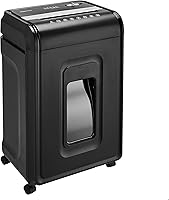
The Bonsaii 12-Sheet Micro-Cut Shredder suits routine manual feeding after opening mail or sorting a small pile of records. Choose it if you prefer feeding documents as you go rather than loading a tray.
It accepts up to 12 sheets at once and runs continuously for up to 20 minutes. Its 4.2-gallon pullout bin has a viewing window, and casters help you move it between storage and a working spot.
This model also accepts credit cards, staples, paper clips, and CDs. Follow its instructions for feeding those materials rather than treating them like a stack of paper.
Skip it if your main task is clearing large stacks without repeated hand feeding. Its overload protection helps manage overfeeding, but it doesn't remove the need to sort pages and stay within capacity.
Which model suits stacks of loose paper?
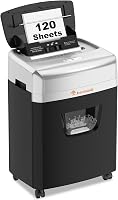
The Bonsaii 120-Sheet Auto-Feed Micro-Cut Shredder suits batch disposal when loading a paper stack is more convenient than feeding small bundles. It makes sense for someone who lets discard piles build up between sessions.
Its auto-feed tray holds up to 120 sheets, while the separate manual feed accepts up to 12 sheets. The larger figure describes tray capacity, not the number of pages passing through the cutters together.
Auto mode allows 30 minutes of operation followed by 60 minutes off; manual mode allows 10 minutes followed by the same cooling period. Its 5.9-gallon pullout bin and casters suit a routine built around larger batches.
Skip it if you mostly shred single pages or need long manual-feed sessions. Its main advantage is the tray, and its manual run time is shorter than the other two options here.
Keep auto-feed use paper-only, and prepare the stack according to the loading instructions. Metallic credit cards are excluded, and other supported items belong in manual feed.
Which model suits longer manual shredding sessions?
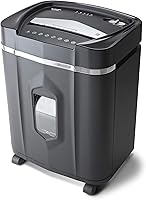
The Aurora AU1225MA suits people who want to keep feeding paper for longer stretches. Its 40-minute continuous run time is the longest among these 3 machines.
It accepts up to 12 sheets per feed and has a 5-gallon pullout basket. Manual reverse helps with jams, while indicators identify overheating, overload, an open door, and a full bin.
The Aurora also accepts CDs, DVDs, credit cards, and small paper clips. That makes it a useful choice for clearing a mix of paper files and supported old media.
Skip it if you want to load a stack into an auto-feed tray. Also check its fit: it measures 14.41 in deep, 11.02 in wide, and 19.33 in high, before allowing room to pull out the basket.
How much capacity and run time do you need?
Match capacity to your usual batch, and run time to the length of your session. A high sheet limit doesn't tell you how long a motor can work before cooling.
A sheet rating is a maximum under the machine's stated conditions. Folded pages, thick paper, and uneven bundles can add load, so feed fewer sheets when the material is harder to handle.
For a few pages each day, manual feeding is straightforward. For a weekly stack of loose paper, auto-feed reduces repeated loading; for a file cleanout, a longer duty cycle matters more.
Our guide to shredder sheet capacity explains how to size the feed limit. Don't choose solely by the largest number on the machine.
Bin capacity affects interruptions too. Leave room to remove the bin without moving furniture, and avoid a setup where emptying it becomes enough trouble that you keep shredding past full.
How do you set up and care for a micro cut shredder?
Place it on a stable, dry surface with clear ventilation and easy bin access. Read the model's instructions before the first feed, especially the accepted materials and lubrication method.
Keep the feed opening away from children and pets. Tie back long hair, secure loose clothing, and keep cords clear of moving casters.
Sort each batch before switching on. Remove anything the machine doesn't accept, and separate discs or cards for the correct slot or feed method.
Lubricate on the schedule and with the supplies the manufacturer recommends. Our guide to how to oil a paper shredder covers the process.
Keep aerosols away from the machine. Don't substitute household sprays or other fluids for approved shredder care supplies.
Empty the bin before scraps crowd the underside of the cutters, and unplug the shredder before cleaning around that area. Never push paper down into the basket while the machine is running.
What mistakes cause jams and interruptions?
Overfeeding, unsupported materials, and an overfull bin are avoidable causes of trouble. Feed paper squarely and let one bundle finish before adding another.
Don't force a thick envelope through simply because the machine accepts mail. Check what's inside, remove unsupported contents, and stay within the manual-feed limit.
“Automatic start” means the cutters respond when you insert paper; it doesn't mean the machine has an auto-feed tray. Only the Bonsaii 120-sheet option here lets you load a stack for that purpose.
Stop when an overload or heat warning appears. Repeatedly switching the machine back on doesn't replace the required cooling break.
For a jam, stop adding paper and follow the model's reverse instructions. If it won't clear, unplug it before further work and use our guide to clearing a paper shredder jam.
What is the right micro cut shredder for your routine?
The right answer to what is a micro cut shredder worth buying starts with your required security level and your usual paper pile. Choose a machine whose feed method you'll use regularly.
Pick the Bonsaii 12-sheet model for routine small batches, the Bonsaii auto-feed for stacks of loose paper, or the Aurora for longer manual sessions. Skip all 3 if your records require a security level above P-4.
Browse the best micro cut paper shredders for more options. If you're still deciding which type of machine you need, start with our paper shredders buying guide.
Frequently asked questions
What is a micro cut shredder used for?
A micro cut shredder breaks private paperwork into small particles before disposal. It suits bank statements, account mail, and personal records you're ready to discard.
Check retention needs before shredding originals, and choose a security level that meets any workplace disposal policy that applies to your records.
Is micro cut better than cross cut?
Micro cut generally makes smaller pieces, so it suits readers who put document privacy first. Cross cut can still meet your needs when its security level fits your records.
Compare the actual cut size and P-level, then choose the capacity and run time that suit your workload.
What does P-4 mean on a micro cut shredder?
P-4 is a paper shredding security classification based on the size of the resulting pieces. All 3 models here carry it, but the micro cut name alone doesn't establish a security level.
Use the required P-level to narrow your choices before comparing convenience features such as auto-feed.
Can a micro cut shredder shred credit cards?
Some micro cut shredders accept credit cards, but the allowed material and feed slot depend on the machine. The Bonsaii 120-sheet model accepts cards through manual feed and excludes metallic credit cards.
Keep its auto-feed tray paper-only, and follow the instructions for the other models before feeding cards.