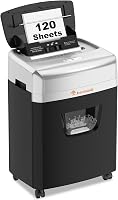
Bonsaii vs Fellowes Paper Shredders: Which Is Better? (October 2026)
In this Bonsaii shredder vs Fellowes shredder comparison, choose Bonsaii for long shredding sessions or Fellowes for its Safety Lock. The Fellowes 14C10 also adds a 5-year cutter warranty.
On this page (10 sections)
- Bonsaii shredder vs Fellowes shredder: which should you choose?
- How much do sheet capacity and run time matter?
- Who should buy each model, and who should skip it?
- Do security level and accepted materials change the choice?
- Which features help with storage and emptying?
- How should you set up the shredder?
- What is the easiest way to handle a large shredding job?
- What care helps prevent avoidable jams?
- How much weight should you give the warranty?
- Bonsaii or Fellowes: which should you buy?
In this Bonsaii shredder vs Fellowes shredder comparison, choose Bonsaii for clearing a paper backlog and Fellowes if a Safety Lock matters most. The Fellowes 14C10 also suits short daily jobs where longer cutter coverage is a priority.
The decision is about these specific models, not a brand-wide winner. A machine that suits someone feeding mail each evening may be a poor match for someone clearing several folders in one sitting.
Start with your usual workload, then consider approved materials, storage and upkeep. The biggest sheet count is only useful if the rest of the machine fits how you work.


Bonsaii shredder vs Fellowes shredder: which should you choose?
Choose Bonsaii for longer batches, the Fellowes 14C10 for brief daily jobs, or the Fellowes 12-sheet Powershred for smaller stacks over a longer session. Both Fellowes options add a lock that disables the machine when needed.
Think about the last pile you needed to destroy. Was it a few opened envelopes, a weekly folder of office papers or an archive box you had put off sorting?
For small daily piles, reaching a continuous run limit may be rare. For a backlog, stopping partway through can leave sensitive papers waiting around and turn one job into several sessions.
A shared room adds another concern: who can reach the controls between uses. Fellowes' lock is useful here, though it doesn't replace unplugging for maintenance or keeping children and pets away from the opening.
Bonsaii vs Fellowes shredders: decide by your routine
Match session length first, then sheet capacity. Choose around the job you repeat most often rather than an unusually large cleanout you might do once.
If you shred while sorting, the smaller Fellowes model deserves attention. If you sort everything first and then feed a large prepared pile, Bonsaii's longer operating window becomes more useful.
How much do sheet capacity and run time matter?
Run time separates these models more than maximum stack size. Bonsaii handles up to 15 sheets for up to 40 minutes, the Fellowes 14C10 handles 14 sheets for up to 10 minutes, and the 12-sheet Powershred runs for up to 20 minutes.
The single-sheet gap between Bonsaii and the 14C10 is small. It shouldn't decide the purchase if your normal stack is well below either limit.
Maximum capacity also isn't a target for every pass. Thick paper, folded sheets and uneven stacks can create more resistance than a neat pile of ordinary office paper.
Use smaller batches when the paper is heavy or mixed, following the manual's limits. Count folded paper by its layers rather than treating a thick folded document as one easy sheet.
Continuous run time doesn't tell you shredding speed or total job time. Sorting, feeding, emptying the bin and cooling all affect how long a cleanout takes.
Bonsaii requires 40 minutes of cooling if overheat protection activates. The Fellowes models also need cooling after their rated sessions; don't assume their break lengths match Bonsaii's.
Our shredder sheet capacity guide helps you choose a sensible feeding limit for your usual documents.
Who should buy each model, and who should skip it?
Buy the model that fits your recurring job, even if another has a higher maximum capacity. Each option has a clear use case and a reason to choose something else.
Fellowes 14C10: for short, frequent shredding jobs
The 14C10 suits daily mail and small office clearouts that you finish promptly. Its appeal is the mix of stack capacity, a Safety Lock and cutter coverage.
Choose it if you keep up with paperwork as it arrives. That habit reduces the need for long uninterrupted sessions and makes its shorter operating window less of a drawback.
Skip it if you routinely save shredding for a large end-of-month batch. Its higher stack limit than the other Fellowes model won't remove the need for earlier cooling breaks.
Bonsaii: for prepared piles and stored paperwork
The Bonsaii suits longer cleanouts, especially if you sort papers before switching on the shredder. It also gives you a way to destroy CDs under its approved loading instructions.
Its swivel casters help if your working spot and storage spot differ. Keep that route clear, and move the machine with its bin properly seated.
Skip it if a disabling lock is your deciding feature. Its longer run time also offers little benefit when you destroy only a few pages at a time.
Fellowes Powershred: for small stacks over a longer session
The 12-sheet Powershred suits steady sorting and feeding where each handful is modest. It offers more operating time than the 14C10 while keeping Fellowes' Safety Lock.
Choose it if you open mail, set aside records to keep and shred the rest as you go. You can work through that routine without needing the largest stack per pass.
Skip it if you regularly want to feed thicker bundles. Don't choose it solely for the Fellowes name without weighing that lower sheet limit against your workload.
Do security level and accepted materials change the choice?
Security level is a tie here; accepted materials can break it. All 3 are P-4 cross-cut shredders, but their cuts have different shapes.
Bonsaii produces particles measuring 13/64 x 63/64 inches. Both Fellowes models produce particles measuring 5/32 x 1-9/16 inches.
One dimension alone doesn't establish that a shredder offers greater protection. Use the stated security level and any document-handling rules you must follow.
For especially sensitive records, first confirm whether P-4 meets your requirements. None of these models becomes a higher-security choice simply because it handles more sheets.
All 3 accept staples and credit cards. Both Fellowes options also accept paper clips and unopened junk mail, while Bonsaii accepts CDs.
Those permissions aren't interchangeable. Remove paper clips before using Bonsaii, and don't feed CDs into either Fellowes model based on the Bonsaii's capability.
Inspect sealed mail for objects that aren't approved, including keys, coins or bulky inserts. Permission to shred unopened mail doesn't mean every envelope and its contents can go through together.
Which features help with storage and emptying?
All 3 have 5-gallon pull-out bins, so access around the machine matters more than the shared bin size. Leave enough room to pull the basket fully out without moving nearby furniture.
Bonsaii adds a clear bin window for checking the fill level. Its casters are useful when you need to roll the machine out for a shredding session.
Avoid packing any bin tightly before emptying it. Shreds can build up near the cutter outlet even when another part of the basket appears to have space.
Stop and unplug before handling buildup near the cutting area, following the manual. Never push shreds down with your hand while the machine is operating.
Fellowes describes the 14C10 as quiet, and Bonsaii specifies operation at 60 dB. Those descriptions don't establish which will be quieter in your room, so schedule shredding around calls if noise would interrupt work.
How should you set up the shredder?
Read the exact model's manual and prepare its working space before the first batch. Setup should make feeding, emptying and switching off easy.
- Choose a stable spot. Keep the shredder dry, away from foot traffic and clear of loose cords or clothing that could reach the feed slot.
- Leave working clearance. You need room above the opening, around ventilation areas and in front of the pull-out bin.
- Seat the parts correctly. Confirm that the head and basket are fitted as directed before connecting power.
- Learn the controls. Find the power switch, reverse function and any lock or warning indicators before feeding paper.
- Start with a small batch. Use a few plain sheets to get familiar with feeding and stopping before working through a larger pile.
On Bonsaii, an incorrectly seated basket or head can prevent its safety switch from engaging. If it won't start, check assembly and the controls before assuming the motor has failed.
Keep the manual accessible for material limits and fault signals. The broader paper shredder buying guide can help if you're still deciding whether a manual-feed cross-cut model suits your routine.
What is the easiest way to handle a large shredding job?
Sort first, then shred in manageable batches. Feeding faster won't help if you destroy something you needed to retain or repeatedly overload the opening.
Make separate piles for records to keep, papers to shred and material that can go into ordinary recycling. Check retention needs before destroying tax, legal or financial records.
Our guide to what documents you should shred at home helps you separate sensitive papers from harmless clutter.
Remove bindings, clips and other items the chosen model doesn't accept. Flatten folded pages and separate stuck sheets so you can judge the batch more accurately.
Feed straight stacks without forcing them into the slot. Let one batch clear before adding the next, and pause if the machine strains or signals an overload.
Check the bin during the job rather than waiting for paper to stop moving. A longer motor run window doesn't remove the need to empty accumulated shreds.
If the shredder stops because of heat, leave it to cool naturally for the required period. Repeatedly switching it on won't shorten that wait.
What care helps prevent avoidable jams?
Keep the bin clear and lubricate the cutters as the manual directs. Regular care matters more than relying on a reverse button after paper has packed into the cutting area.
Bonsaii recommends cleaning the waste basket and cutters regularly, along with oil-pack maintenance. Follow the instructions for the exact machine rather than choosing an interval from another model.
Use only a lubricant approved for shredders and compatible with the manual. Household oils and sprays aren't substitutes for the required maintenance product.
Our guide to how to oil a paper shredder explains the process. The shredder oil or lubricant sheets comparison helps you understand the different application methods.
If paper stalls, stop feeding immediately. Use reverse only as directed, and unplug before any manual clearing allowed by the instructions.
Keep fingers and tools away from the cutters. For a blockage that won't clear through the controls, follow our guide to clearing a paper shredder jam alongside the model's manual.
Bonsaii's auto start, stop and reverse functions help manage feeding, but they don't make overloading harmless. Respect the capacity even when the machine can reverse paper.
How much weight should you give the warranty?
The 14C10 has the clearest warranty advantage here, with a 1-year product and service warranty plus a 5-year cutter warranty. Bonsaii provides a 1-year limited warranty.
Cutter coverage and whole-machine coverage are separate terms. A longer cutter warranty doesn't mean every component has the same protection for the same period.
For the 12-sheet Powershred, contact Fellowes to confirm the coverage that applies. Don't carry the 14C10's warranty terms across to another model.
Save your receipt and model details, and read the conditions before relying on coverage. Warranty length can settle a close choice, but it won't make a short-session machine fit a long-session workload.
Bonsaii or Fellowes: which should you buy?
For Bonsaii shredder vs Fellowes shredder, choose around the work you want to finish in one sitting. Bonsaii is the fit for prepared backlogs; the 14C10 suits frequent short jobs where its lock and cutter coverage matter.
Choose the 12-sheet Powershred if you prefer Fellowes' lock and feed modest stacks throughout a longer sorting session. Pass on all 3 if your document rules require a different security level.
Before ordering, picture one normal shredding job and where you'll empty the bin. If Bonsaii fits that routine, our Bonsaii paper shredder guide compares more options from the brand.
Frequently asked questions
Is Bonsaii or Fellowes better for a home office?
Choose Bonsaii for longer sessions clearing accumulated paperwork, or Fellowes if a Safety Lock is a priority. The Fellowes 14C10 also has longer cutter coverage.
For routine home office use, match the machine to your usual session length rather than choosing by the highest sheet count alone.
Which shredder can run longer without cooling?
The Bonsaii has the longest rated continuous run time at up to 40 minutes. The Fellowes 12-sheet Powershred allows up to 20 minutes, while the 14C10 allows up to 10 minutes.
These are operating limits, so follow the manual and let an overheated machine cool before resuming.
Do these shredders have the same security level?
All 3 are P-4 cross-cut shredders, although their particle shapes differ. That makes security level a shared feature rather than the main reason to choose one of these models.
Our guide to paper shredder security levels explains how to match the cut to the information you handle.
Can these shredders handle staples and credit cards?
Yes, all 3 accept staples and credit cards. Both Fellowes models also accept paper clips and unopened junk mail, while the Bonsaii accepts CDs.
Follow the manual's separate loading instructions for each material, and don't assume a paper sheet limit also applies to cards, discs or sealed envelopes.
How should I choose between the Fellowes 14C10 and 12-sheet Powershred?
Choose the 14C10 for larger stacks per pass and its 5-year cutter warranty. Choose the 12-sheet Powershred for smaller stacks spread across a longer session.
Both include a Safety Lock, so the useful distinction is how you feed paper and how long you need to keep working.