Bonsaii vs Amazon Basics Auto Feed Shredders: Which Is Better? (October 2026)
In this Bonsaii vs Amazon Basics shredder comparison, choose Bonsaii for large micro-cut batches and longer manual sessions. Choose Amazon Basics for a larger bin, with cross-cut and micro-cut options for different batch sizes.
On this page (11 sections)
- Bonsaii vs Amazon Basics shredder: which fits your paperwork?
- Does micro-cut make Bonsaii the safer choice?
- How do run times affect a real shredding session?
- Which shredder handles mixed documents better?
- Do the bins, wheels and alerts change the choice?
- How should you set up an auto-feed shredder?
- How do you load paper without causing avoidable jams?
- What care helps keep shredding sessions consistent?
- What buying mistakes should you avoid?
- Is Bonsaii or Amazon Basics the better value for your routine?
- The decision rule for Bonsaii vs Amazon Basics shredders
In this Bonsaii vs Amazon Basics shredder comparison, Bonsaii is the better fit for large micro-cut batches and frequent manual use. Amazon Basics suits buyers who prefer a larger bin and can choose their tray capacity around the cut type they need.
The key is how your paperwork arrives: neat stacks favor auto feed, while mixed documents require more sorting and manual feeding. Start with that routine before comparing small differences in bin size.
For the wider buying picture, our paper shredder guide explains the main types and features.
 Best for large office backlogs
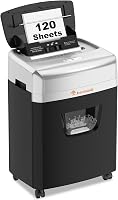
Bonsaii 200-Sheet Auto-Feed Micro-Cut Shredder
 Best for shared office paperwork
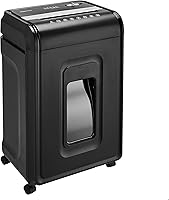
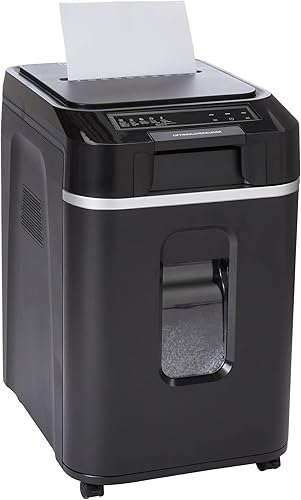
Amazon Basics 200-Sheet Auto-Feed Cross-Cut Shredder
Bonsaii vs Amazon Basics shredder: which fits your paperwork?
Choose Bonsaii for large stacks plus regular manual shredding, the Amazon Basics cross-cut model for large paper batches, or the Amazon Basics micro-cut model for smaller routine clearouts.
These are specific model choices, not a verdict on every shredder from either brand. A brand name alone doesn't tell you the cut size, accepted materials or operating limits.
Which Bonsaii or Amazon Basics shredder suits large backlogs?
The Bonsaii and Amazon Basics cross-cut models each accept up to 200 sheets automatically. The Amazon Basics micro-cut model accepts up to 150 sheets, so a stack that fits either larger tray needs splitting on that machine.
That difference matters most when you regularly clear folders or several weeks of paperwork. If your usual stack fits the smaller tray, extra capacity won't save a reload on that task.
Auto-feed capacity describes how much you can load, not how quickly the stack finishes. Don't read a higher sheet count as proof of faster shredding.
Which model suits each buyer?
Bonsaii fits an office that alternates between stacked documents and manual work. Its longer manual operating window is useful when you spend time sorting and feeding documents that don't belong in the automatic tray.
The Amazon Basics cross-cut model fits a shared paperwork station where large loads and clear status lights matter. Choose it when its security level meets your needs and smaller micro-cut pieces aren't a priority.
The Amazon Basics micro-cut model fits weekly home or small-office clearouts. It makes sense when your batches fit its tray and you want smaller pieces without needing the largest load capacity here.
Does micro-cut make Bonsaii the safer choice?
Bonsaii doesn't have a higher stated security level than these Amazon Basics models. All 3 are P-4, although the micro-cut machines produce smaller pieces.
Bonsaii and the Amazon Basics micro-cut model cut paper into 4 x 12 mm pieces. The Amazon Basics cross-cut model produces 4 x 20 mm pieces.
Choose micro-cut if smaller fragments are part of your document disposal plan. For a workplace, follow the required security level for your records rather than relying on words such as “micro” or “high security.”
If your policy requires something above P-4, skip all 3. None becomes a higher-security model because it has a large tray or a heavy-duty name.
Our guide to paper shredder security levels explains how to match the level to the task. The explanation of micro-cut shredders covers the cut type in more detail.
How do run times affect a real shredding session?
All 3 allow up to 60 minutes of auto-feed operation, but Bonsaii gives you a longer manual session. That distinction matters if much of your work happens through the manual slot.
Bonsaii allows up to 30 minutes manually, compared with 10 minutes for either Amazon Basics model. Both Amazon Basics models require a 45-minute cooldown after reaching either operating limit.
A full tray and a full run cycle are different limits. Reloading the tray doesn't mean the motor has cooled, so track the whole session rather than treating each new stack as a fresh start.
For occasional home paperwork, you may finish well before a run limit. During a large office clearout, plan sorting or filing work for cooling breaks instead of expecting continuous shredding all afternoon.
Bonsaii's cooling instructions should guide its breaks. Don't assume its cooling schedule matches Amazon Basics because the automatic run limits match.
Skip these models if your workflow demands uninterrupted operation beyond their duty cycles. A long backlog is manageable in stages, but a machine's run limit still applies.
Which shredder handles mixed documents better?
Bonsaii is the stronger choice for frequent manual work, with a 12-sheet manual limit and support for credit cards, staples and paper clips. Both Amazon Basics models accept up to 10 sheets manually.
The Amazon Basics micro-cut model also accepts credit cards, staples and small paper clips. The cross-cut model accepts stapled paper, but don't assume it supports every material accepted by the other two.
Material support and feed location are separate decisions. A shredder that accepts a card doesn't necessarily accept that card through its automatic tray.
Bonsaii's automatic mode is for 8.5 x 11-inch, 20 lb paper. The Amazon Basics micro-cut model also specifies 20 lb paper and a letter-size automatic tray.
Sort receipts, folded sheets, sticky notes and unusual stock before loading. Check the manual for their correct handling rather than mixing everything into a stack and hoping the feeder separates it.
Both Amazon Basics models warn against metallic credit cards. For any machine here, keep unsupported materials out and use the manual's instructions for accepted cards.
If most of your pile needs individual attention, auto feed may save less effort than you expect. The main benefit comes from loading suitable paper together.
Do the bins, wheels and alerts change the choice?
Bin access and clear stopping alerts matter more than the small capacity gap. Both Amazon Basics models have 8.5-gallon pull-out bins, while Bonsaii has an 8.1-gallon pull-out bin.
The difference is just 0.4 gallons. That alone isn't a strong reason to give up your preferred cut type or choose a tray that doesn't fit your normal batches.
Both Amazon Basics models provide lights for feed error, bin full, door open, overload and overheat. Those alerts help a shared office user work out whether to empty the bin, close the door or allow cooling.
They also include anti-jam auto reverse and automatic motor protection against overheating. These features help manage interruptions, but careful loading still matters.
Bonsaii has 4 wheels, and the Amazon Basics micro-cut model includes casters. Leave a clear route if you'll move either machine between work areas.
Bonsaii specifies sound output of no more than 58 dB and sleep mode after 10 minutes of inactivity. Both Amazon Basics models also have sleep mode, but there's no matching sound figure here to support a quietness ranking.
How should you set up an auto-feed shredder?
Give the shredder room to load, ventilate and empty before its first job. A spot that fits the cabinet can still be awkward if you can't lift the tray cover or pull the bin fully out.
Measure the space with those movements in mind. Keep the machine on a stable, level surface, clear of foot traffic and away from places where children or pets could reach the feed opening.
Read the setup and safety instructions before connecting power. Confirm that the bin and access doors are seated, and remove packing materials as directed.
Start with a small stack of suitable paper so you can learn the controls and indicator lights. Keep the manual nearby until everyone using the shredder knows what each stopping condition means.
Set up a sorting area beside the machine. Separate records to keep, suitable auto-feed paper and items that need manual handling before switching it on.
Keep aerosols away from the shredder; both Amazon Basics models expressly warn against using or storing them nearby. Don't leave loose clothing, hair or lanyards close to the feed opening.
How do you load paper without causing avoidable jams?
Load flat, aligned paper within the correct mode's limit. An automatic tray's capacity never applies to the manual slot.
Square the edges of the stack and remove folds or curled corners where possible. Follow the tray guides, and avoid forcing a stack down to make an overfilled tray close.
Paper thickness matters as well as sheet count. A capacity based on ordinary office paper isn't permission to feed the same number of heavier sheets.
For manual feeding, start below the maximum when the stack is uneven or the paper is heavier. Feed it straight and let the machine finish before adding more.
Use the correct mode for attachments. Don't assume staples or clips can go through every opening simply because the machine supports them somewhere.
Stop if feeding becomes uneven or the motor struggles. Adding more paper to push a blockage through can make it harder to clear.
Use the reverse controls only as the manual directs, and switch off and unplug before any permitted work near the cutters. Our guide to clearing a paper shredder jam walks through the process.
What care helps keep shredding sessions consistent?
Empty the bin before shreds crowd the cutting area, and follow the model's lubrication instructions. Waiting until paper backs up can turn a simple emptying task into a feeding problem.
Switch off and unplug before removing accumulated material or cleaning accessible areas as directed. Never reach into the cutters or use improvised tools around them.
Bonsaii includes 12 lubricant sheets. Use them according to its instructions rather than choosing a schedule based only on how many sheets came in the box.
For all 3 machines, use only the lubricant method and product type the manual permits. Household sprays and random oils aren't substitutes for approved shredder care.
Our guide to oiling a paper shredder explains the basic process. The machine's own instructions should set the method and interval.
Don't treat repeated overheating as a signal to restart immediately after every stop. Reduce the workload, allow the required cooling period and check that ventilation openings remain clear.
What buying mistakes should you avoid?
Avoid paying for a workflow you won't use or choosing around one headline number. Tray capacity, cut type and manual handling need to fit the same routine.
Buying auto feed for a few daily sheets
A large tray does little for someone who shreds a few pages as they arrive. You may prefer a simpler machine if there's rarely a stack to load.
These models make more sense when paper builds into batches. Our shredder sheet-capacity guide helps put manual capacity in context.
Treating a bin size as a paper count
Bin volume doesn't tell you exactly how many original documents fit. Cut shape, settling and the point at which you empty it all affect the result.
Don't plan a large clearout around a fixed number of pages per bin. Keep disposal supplies nearby and allow time to empty it during the job.
Assuming a larger model meets every office need
A large automatic tray doesn't expand the accepted-material list or raise the security level. Confirm both before choosing a machine for workplace records.
Likewise, don't buy around wheels alone. A shredder still needs a usable loading area, accessible controls and space for emptying.
Is Bonsaii or Amazon Basics the better value for your routine?
Bonsaii offers more useful flexibility for buyers who combine large micro-cut batches with manual sessions. Amazon Basics offers two clearer alternatives: large cross-cut loads or smaller micro-cut batches with a larger bin.
Judge value by the task you repeat. A feature earns its place when it saves a reload, fits a required cut type or makes a common interruption easier to handle.
Don't choose the Amazon Basics micro-cut model if splitting your regular stack would become a daily nuisance. Conversely, don't choose Bonsaii solely for extra tray capacity if your paperwork never needs it.
Skip the Amazon Basics cross-cut model if smaller fragments are a firm requirement. Its status lights and bin capacity don't change the size of its output.
For more detail on the lead option, read our Bonsaii 200-sheet auto-feed shredder review. The Bonsaii shredder guide covers other options if these machines don't fit your workload.
The decision rule for Bonsaii vs Amazon Basics shredders
For Bonsaii vs Amazon Basics shredders, let your largest recurring stack and your manual workload settle the choice. Choose Bonsaii when large micro-cut loads and longer manual sessions both matter.
Choose the Amazon Basics cross-cut model when large automatic batches are the priority and P-4 cross-cut output meets your requirements. Choose its micro-cut sibling when your regular stack fits the smaller tray and you prefer its bin and operating alerts.
Before ordering, sort a typical batch and check the materials, feed mode and available space. That short exercise will tell you more than choosing by brand alone.
If neither brand fits your routine, use our Bonsaii vs Fellowes paper shredder comparison to broaden the choice.
Frequently asked questions
Is Bonsaii or Amazon Basics better for auto feed?
Bonsaii is the better fit for large micro-cut batches because its automatic tray accepts up to 200 sheets. Amazon Basics offers the same capacity with cross-cut output, or micro-cut output with a 150-sheet tray.
Choose around your usual stack size and required cut type rather than the brand alone.
Are these auto-feed shredders P-4?
All 3 models have a P-4 security level, but their paper pieces differ in size. Bonsaii and the Amazon Basics micro-cut model produce 4 x 12 mm pieces, while the Amazon Basics cross-cut model produces 4 x 20 mm pieces.
Smaller pieces do not mean a higher stated security level here.
Can the Bonsaii shred credit cards?
Yes, the Bonsaii accepts credit cards through its manual entry, which also handles staples, paper clips and up to 12 paper sheets. Keep those materials out of the automatic tray, which is for specified letter-size paper.
Follow the manual's material and loading instructions before feeding anything other than plain paper.
Which shredder has the largest bin?
Both Amazon Basics models have an 8.5-gallon pull-out bin, compared with Bonsaii's 8.1-gallon bin. The difference is 0.4 gallons, so bin size alone is a weak reason to choose between them.
Cut size, how paper settles and when you empty the bin also affect your routine.
How do the auto-feed run times compare?
All 3 models allow up to 60 minutes of auto-feed operation. Bonsaii allows 30 minutes manually, compared with 10 minutes for either Amazon Basics model.
Both Amazon Basics models require a 45-minute cooldown after reaching either run limit; follow Bonsaii's manual for its cooling instructions.