Bonsaii vs Aurora Paper Shredders: Which Is Better? (October 2026)
In this Bonsaii vs Aurora paper shredders comparison, choose Bonsaii for regular batch shredding, Aurora AU110MB for tight spaces, or AU120MA for batch shredding with clear status lights. All 3 provide P-4 micro-cut security.
On this page (9 sections)
- Bonsaii vs Aurora paper shredders: which should you choose?
- Who should buy each model, and who should skip it?
- How much automatic and manual capacity do you need?
- Which bin and cabinet will fit your workspace?
- Do these micro-cut shredders offer different security?
- How do run time and cooldown affect a large job?
- How should you set up and load an auto-feed shredder?
- What care and operating mistakes should you avoid?
- Bonsaii vs Aurora paper shredders: the final decision
Choose Bonsaii for regular batch shredding, Aurora AU110MB for tight spaces, or Aurora AU120MA for recurring batches with clear status lights in this Bonsaii vs Aurora paper shredders comparison.
The main buying choice is how you handle paper: save a stack for later, feed a few sheets as they arrive, or share the machine with other people. Bin space, cabinet size and controls matter more here than the small difference in maximum automatic load.
These recommendations apply to the 3 models below. They don't establish that every shredder from one brand is better than every shredder from the other.
 Best for regular batch shredding
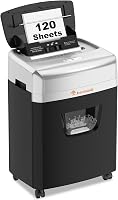
Bonsaii 120-Sheet Auto-Feed Micro-Cut Shredder
 Best for tight office spaces
Aurora AU110MB 110-Sheet Auto-Feed Shredder
Bonsaii vs Aurora paper shredders: which should you choose?
Bonsaii is the strongest all-around choice here for an office that combines paper batches with small manual jobs. The AU110MB earns its place through its smaller cabinet, while the AU120MA suits buyers who want larger automatic loads and clear operating indicators.
Start with the pile you normally shred, rather than the biggest cleanout you might do once a year. A machine that fits your weekly routine is easier to use regularly than one chosen around an unusual backlog.
Also decide where it will live before comparing features. A larger bin helps only if you can pull it out easily, and an automatic feeder needs enough access to load paper without moving the machine every time.
For broader help with feed styles and placement, our complete paper shredder buying guide explains how to narrow the category before choosing a model.
| Product | Best for | Auto-feed capacity | Manual capacity | Bin capacity | Our score |
|---|---|---|---|---|---|
| Bonsaii 120-Sheet Auto-Feed Micro-Cut Shredder | regular batch shredding | 120 sheets | 12 sheets | 5.9 gallons | 8.7 |
| Aurora AU110MB 110-Sheet Auto-Feed Shredder | tight office spaces | 110 sheets | 10 sheets | 4 gallons | 7.9 |
| Aurora AU120MA 120-Sheet Auto-Feed Shredder | shared office routines | 120 sheets | 10 sheets | 5 gallons | 7.8 |
Bonsaii vs Aurora shredders for different work habits
Choose by your most common job:
- Weekly paper piles: Bonsaii offers the most collection space and the highest manual capacity of these options.
- A tight desk corner: Aurora AU110MB has the smallest cabinet in every dimension.
- A shared shredding station: Aurora AU120MA combines larger automatic loads with lights that distinguish several reasons for a pause.
- Occasional individual documents: Consider whether automatic feeding will save you enough effort to justify the space.
The AU110MB also has status lights, so you don't need the larger Aurora just to get that feature. Its smaller bin is the more meaningful tradeoff.
Who should buy each model, and who should skip it?
Buy Bonsaii if reducing interruptions matters most, AU110MB if space is limited, or AU120MA if its batch capacity and indicators match your office routine. Skip any model whose size or duty cycle conflicts with how you need to work.
Bonsaii: for paper batches plus daily manual jobs
Bonsaii makes sense when you collect statements, correspondence and other approved papers, then shred them together. Its larger bin gives those sessions more room before emptying becomes another task.
It also fits a desk routine that mixes automatic loads with small stacks fed by hand. That flexibility is useful when you don't want to open the automatic compartment for every few pages.
Skip it if you expect to feed papers manually for long stretches. Its shorter manual duty cycle is a real limit for someone who plans to stand beside the machine and keep feeding it.
Aurora AU110MB: for offices with limited room
The AU110MB suits someone who wants automatic feeding but can't give a shredder much floor space. It's also the better fit when you expect to reposition the machine, since it includes casters.
Choose it for regular smaller batches rather than buying extra cabinet size for rare cleanouts. Emptying a smaller bin can be a reasonable trade when the shredder must fit beside a desk.
Skip it if you already find frequent bin emptying a nuisance. Its space savings won't help much if your normal workload keeps filling the basket.
Aurora AU120MA: for recurring batches in a shared space
The AU120MA fits an office where paper arrives in stacks and different people use the machine. Its indicators help users distinguish a full bin from a feed, door, overload or heat condition.
That matters when the person loading the next batch wasn't there when the machine stopped. A clear status cue gives them a useful starting point before they try feeding more paper.
Skip it if you need the smallest cabinet or often move equipment between rooms. It is the deepest model here and weighs 24.3 pounds, so plan its position carefully.
How much automatic and manual capacity do you need?
Match automatic capacity to your usual stack and manual capacity to your daily interruptions. Bonsaii and AU120MA accept up to 120 sheets automatically, while AU110MB accepts up to 110.
Bonsaii's manual limit is 12 sheets; both Auroras handle up to 10. Those manual limits apply to the manual feed, not the automatic compartment.
For a pile that fits all 3, the difference in automatic capacity won't change the number of loads. For a stack just over the smaller model's limit, it means separating the job into another load.
Don't treat the maximum sheet count as a target for every type of paper. Thicker stock, folds and uneven edges can make a stack harder to feed, so prepare paper according to the manual.
Automatic feeding saves repeated hand feeding, but it doesn't remove preparation. Sort the stack, remove unsuitable materials and arrange the pages as directed before starting.
Our guide to shredder sheet capacity explains how to judge capacity against your actual paper volume. If your usual pile needs repeated reloads, compare the best auto-feed paper shredders before settling on this size.
Which bin and cabinet will fit your workspace?
Choose Bonsaii for collection space and AU110MB for the smallest cabinet. The bins hold 5.9 gallons in Bonsaii, 4 gallons in AU110MB and 5 gallons in AU120MA.
All 3 use pullout bins. Leave clear floor space in front so you can remove the basket without dragging the whole machine away from the wall.
Their cabinet dimensions, shown as depth x width x height, are:
- Bonsaii: 10.35 x 14.45 x 19.96 inches.
- Aurora AU110MB: 8.7 x 13.4 x 18.8 inches.
- Aurora AU120MA: 11.3 x 14.41 x 19.69 inches.
Measure the working space, not just the cabinet's resting spot. Allow access to load paper, read controls and empty the bin, especially if you're considering a position under a desk.
Bonsaii includes casters and a transparent bin window. It also stops automatically when the bin is about 80% full, so don't expect to fill every part of the basket before emptying.
Avoid pushing shreds down to keep working past a full-bin warning. Stop the machine and empty it instead, keeping your hands away from the cutting area.
For liners and cleanup, see our guide to paper shredder bags. Use a bag only if your model permits it, and keep it clear of sensors and moving parts.
Do these micro-cut shredders offer different security?
All 3 provide P-4 security, so security level alone doesn't separate them. Bonsaii and AU120MA cut paper into 5/32 x 15/32-inch pieces; AU110MB makes 5/32 x 9/16-inch pieces.
The slightly different piece lengths don't put these models into different P-levels. If your workplace requires a higher level, choose equipment that meets that requirement rather than choosing between these on brand alone.
For household use, decide which documents actually need secure disposal before building a shredding pile. Separating sensitive pages from ordinary recyclable paper reduces unnecessary work and bin emptying.
Keep required records out of the pile until you're sure you can discard them. Shredding is a disposal step, so a quick sort beforehand matters as much as choosing the machine.
Our guide to paper shredder security levels explains how the levels relate to your needs.
How do run time and cooldown affect a large job?
Plan around the duty cycle, not just stack capacity. Bonsaii allows 30 minutes of automatic operation followed by 60 minutes off, while manual operation allows 10 minutes on followed by 60 minutes off.
Both Aurora models offer a 30-minute continuous run time. Follow their manuals for cooldown requirements and any mode-specific limits before planning back-to-back sessions.
A continuous run time is an operating limit, not a promise that every loaded stack takes that long. Don't use it to estimate pages per session without accounting for feeding, sorting and bin emptying.
For a file-cabinet cleanout, divide the work into manageable sessions. Use breaks to sort the next pile and deal with the collected shreds rather than trying to restart a warm machine immediately.
Skip all 3 if your workflow requires uninterrupted operation beyond their duty limits. Sharing a shredder also requires coordination, since the next user may arrive after someone else has already used most of the available run time.
How should you set up and load an auto-feed shredder?
Place the machine for easy access, read its loading instructions and separate paper from other materials before starting. Good preparation avoids asking the feeder to handle a stack it wasn't designed to accept.
Set the cabinet on a level surface near a suitable outlet. Keep the cord out of walking paths, maintain the clearance required by the manual and leave the controls easy to reach.
Before the first load, remove packing materials as directed and make sure the bin and any covers are correctly seated. Keep loose clothing, hair, cords and children's hands away from the feed opening.
Bonsaii's automatic mode accepts paper only. Its manual mode supports paper, cards and staples, but metallic credit cards must stay out.
Both Auroras support paper and credit-card shredding. Use the opening and method their manuals specify for cards, and don't assume card support means cards belong in an automatic paper stack.
Straighten pages and remove anything the automatic feeder doesn't permit. Don't use the manual feed as an overflow route while automatic shredding is underway unless the instructions expressly allow that operation.
For mixed mail, sort envelopes and contents before feeding. Thick folds, inserts and attached objects need attention rather than being treated as ordinary flat sheets.
What care and operating mistakes should you avoid?
Avoid overloading, ignoring warning lights and using unapproved lubricants. Automatic feeding and reverse features help manage operation, but careful loading and routine cleanup still matter.
Both Auroras have automatic start and stop, jam prevention auto reverse and overload protection. Their status lights cover feed errors, bin fullness, an open door, overload and overheating, along with power or standby status.
Read the light before adding paper when an Aurora pauses. A full bin needs emptying, while an overheat condition calls for the cooling procedure in the manual.
If a stack feeds poorly, stop and inspect its preparation rather than repeatedly forcing it through. Repeatedly restarting the same unsuitable stack doesn't correct folded pages or excess material.
For a jam, use the controls only as directed. Switch off and unplug the shredder before any permitted manual clearing, and never reach into the cutters.
Our guide on how to clear a paper shredder jam explains the basic process. Stop if clearing would require work beyond the maintenance allowed in the manual.
Lubricate with the method and materials approved for your exact model. Follow our guide on how to oil a paper shredder alongside those instructions, and keep aerosol products away from the Bonsaii.
Empty the basket before shreds crowd the cutting area, and clean accessible paper dust as directed. Don't spray household cleaners into the feed opening.
Bonsaii vs Aurora paper shredders: the final decision
Pick Bonsaii if your main goal is handling recurring paper piles with fewer emptying breaks. Pick AU110MB when cabinet space determines the purchase, or AU120MA when you want full-size automatic loads with clear status cues.
Before ordering, check 3 things: your normal stack size, the space needed to load and empty the machine, and whether your schedule allows cooling breaks. Those checks will settle this Bonsaii vs Aurora paper shredders decision more reliably than brand preference.
If you're still comparing models within Bonsaii, browse the best Bonsaii paper shredders. For larger routine stacks, the Bonsaii 200-sheet auto-feed review is the useful next comparison.
If document requirements drive your choice, confirm the required P-level in our security level guide before choosing any of these models.
Frequently asked questions
Is Bonsaii or Aurora better for auto-feed shredding?
Bonsaii is the better fit when you want more bin space and higher manual capacity alongside automatic feeding. Aurora AU110MB suits tighter spaces, while AU120MA matches Bonsaii's automatic stack size and adds clear operating indicators.
Choose around your normal paper pile, available space and willingness to empty the bin.
Do these shredders have the same security level?
Yes, all 3 provide P-4 micro-cut shredding, although the AU110MB produces slightly longer paper pieces than the other 2. Choose according to the security level your documents require.
A micro-cut label alone does not establish that a shredder meets an employer's rules for handling confidential records.
Can the Bonsaii auto-feed shred credit cards?
No, Bonsaii's automatic feed accepts paper only; use its manual mode for approved cards and staples. Metallic credit cards must stay out of this shredder.
Separate nonpaper items before loading an automatic stack, and follow the manual's instructions for the correct opening and feeding method.
Which shredder has the biggest bin?
Bonsaii has the biggest bin at 5.9 gallons, compared with 5 gallons for Aurora AU120MA and 4 gallons for AU110MB. That makes Bonsaii the stronger choice for reducing emptying interruptions during similar jobs.
Actual collection capacity also depends on how loosely the shredded pieces settle.
How often should you oil an auto-feed shredder?
Follow your exact model's oiling schedule and approved lubricant instructions rather than using one interval for every shredder. Keep aerosol products away from the Bonsaii.
Our guide on how to oil a paper shredder explains the care process, but the model's manual determines the method you should use.