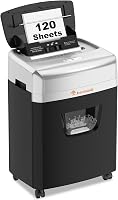
Bonsaii 200-Sheet Auto Feed Shredder Review: Worth It? (October 2026)
The Bonsaii 200-sheet auto feed paper shredder is a strong fit for offices with recurring stacks of letter-size documents. Choose it for batch shredding and longer manual sessions; choose the smaller Bonsaii if your piles rarely fill a large tray.
On this page (9 sections)
- Is the Bonsaii 200-sheet auto feed paper shredder right for your office?
- What do sheet capacity and run time mean for your workload?
- How secure is the Bonsaii's micro-cut output?
- Which papers and cards go in each feed path?
- How does it compare with the smaller Bonsaii and Amazon Basics?
- How should you set it up and load the first batch?
- What care keeps batch shredding practical?
- Which common mistakes should you avoid?
- Should you choose the Bonsaii 200-sheet auto feed paper shredder?
The Bonsaii 200-sheet auto feed paper shredder suits offices that regularly collect full stacks of letter-size documents. Its main benefit is less time spent feeding paper, with a separate manual slot for daily documents and compatible cards.
Buy it for a recurring workload, rather than a single drawer cleanout. The smaller Bonsaii makes more sense for modest weekly piles, while Amazon Basics offers another large-tray option for stapled paperwork.
Is the Bonsaii 200-sheet auto feed paper shredder right for your office?
Choose this Bonsaii if batch loading would change your routine and you also need longer manual sessions. Skip it if most shredding jobs involve a few pages that you can feed in one pass.
Bonsaii 200-Sheet Auto-Feed Micro-Cut Shredder: Best for busy shared offices

- 200-sheet auto-feed capacity
- P-4 micro-cut
- Up to 60 minutes in auto mode
- 8.1-gallon bin
Fits offices that collect full paper stacks and also need a manual slot for daily documents and compatible cards.
Pros
- Large tray reduces repeated hand feeding
- Manual mode runs for up to 30 minutes
- Pull-out bin and wheels simplify emptying and placement
- Includes 12 lubricant sheets
Cons
- Weighs 33.9 lb
- Auto-feed requires letter-size paper
- Needs floor space and clearance for the bin
A shared office can collect approved disposal papers in a secure place, sort them and load them together. That reduces repeated trips to the shredder, though someone still needs to prepare the stack and deal with the shredded paper.
The separate manual entry is useful when a small urgent job shouldn't wait for the next batch. It also gives compatible cards and fasteners a different route from the paper-only tray.
Who should buy the Bonsaii 200-sheet auto-feed paper shredder?
Buy it if paperwork arrives in bursts, such as after filing days or scheduled record cleanouts. The larger tray matters most when your normal stack would otherwise require several smaller loads.
Don't buy extra tray capacity just because your office has several people. A mostly digital team may produce less waste than one person handling printed forms all day.
This model also needs a proper floor location. Its body measures 15.9 x 13.8 x 22.2 in, depth x width x height, and weighs 33.9 lb, so frequent lifting shouldn't be part of your plan.
The 4 wheels help with moves across the office floor. Allow room above for loading and in front for pulling the basket fully out, rather than measuring only the body.
What do sheet capacity and run time mean for your workload?
Tray capacity controls batch size; run time controls session length. Neither tells you how many full trays you can finish in an hour.
The main Bonsaii accepts up to 200 sheets automatically or 12 sheets through the manual slot. Bonsaii specifies up to 60 minutes of continuous automatic use and up to 30 minutes of manual use.
That longer manual allowance matters if your work involves repeated small stacks that don't suit the tray. It offers less benefit if nearly everything you shred can go into automatic mode.
Think about your busiest normal session before choosing. A weekly pile that fits in one smaller tray doesn't call for the same machine as recurring office backlogs.
Also leave room in your schedule for sorting, emptying and cooling. Don't plan a records cleanup around the motor's maximum run time alone.
Our guide to how many shredder sheets you need explains the difference between manual pass capacity and the amount of paper you handle over a day.
How secure is the Bonsaii's micro-cut output?
The Bonsaii produces 4 x 12 mm pieces at security level P-4. Choose it only if that level meets the disposal rules for your documents.
Both Bonsaii models here make the same size pieces. The Amazon Basics produces longer pieces but also carries P-4, so the words “micro-cut” and “cross-cut” don't by themselves settle the security decision.
For personal paperwork, match the machine to the information you're discarding. For workplace records, follow the required security level and any approved disposal process.
A shredder also doesn't decide when a document is ready for disposal. Check retention needs before loading tax records, contracts or anything your business must keep.
Our guide to paper shredder security levels explains the scale. If your policy calls for a finer cut, compare P-4 and P-5 shredders before buying.
Keep documents awaiting shredding in a controlled place. Smaller output pieces don't protect a stack left beside the machine before it enters the cutters.
Which papers and cards go in each feed path?
Use the automatic tray for compatible letter-size paper and the manual slot for approved specialty items. Sorting first prevents a mixed pile from becoming a feed problem.
For the main Bonsaii, automatic mode is specified for 8.5 x 11 in sheets at 20 lb, 75 gsm. Its manual mode accepts credit cards, staples and paper clips as well as paper.
Don't assume that means stapled or clipped stacks belong in the automatic tray. Route those items according to the manual, and separate anything whose compatibility is unclear.
Remove binder clips, rubber bands and other loose objects while sorting. Keep labels, sticky materials, envelopes and unusually thick paper out of the automatic stack unless the instructions expressly allow them.
Card compatibility also needs care. The smaller Bonsaii and Amazon Basics explicitly prohibit metallic credit cards, and ordinary card support isn't permission to shred every material shaped like a card.
If you're clearing a filing cabinet, sort by disposal need before sorting by feed path. Our guide to what documents you should shred at home helps you decide what belongs in the disposal pile.
How does it compare with the smaller Bonsaii and Amazon Basics?
Choose the smaller Bonsaii for manageable batches and Amazon Basics for large stapled stacks with clear status controls. The main Bonsaii stands out for its longer manual operating allowance.
| Model | Auto-feed capacity | Cut size and level | Bin | Automatic run time |
|---|---|---|---|---|
| Bonsaii 200-Sheet | Up to 200 sheets | Micro-cut, 4 x 12 mm, P-4 | 8.1 gal | Up to 60 minutes |
| Bonsaii 120-Sheet | Up to 120 sheets | Micro-cut, 4 x 12 mm, P-4 | 5.9 gal | 30 minutes |
| Amazon Basics 200-Sheet | Up to 200 sheets | Cross-cut, 4 x 20 mm, P-4 | 8.5 gal | 60 minutes |
Bonsaii 120-sheet: choose it for smaller weekly piles
Bonsaii 120-Sheet Auto-Feed Micro-Cut Shredder: Best for weekly home-office batches

- 120-sheet auto-feed capacity
- P-4 micro-cut
- 30 minutes in auto mode
- 5.9-gallon bin
Suits home offices with manageable weekly stacks, room for a smaller bin and time between shredding sessions.
Pros
- Shallower body than the larger Bonsaii
- Same cut size as the 200-sheet Bonsaii
- Pull-out bin with casters
- Manual mode accepts paper, cards and staples
Cons
- Requires 60 minutes off after either mode reaches its limit
- Manual mode runs for 10 minutes
- Cannot shred metallic credit cards
The smaller Bonsaii suits a home office that can finish routine shredding in a short session. You keep the same paper cut size without making room for the larger Bonsaii's deeper body.
Its dimensions are 10.35 x 14.45 x 19.96 in, depth x width x height. It's shallower and shorter than the main model, though slightly wider, so measure the actual spot rather than assuming every dimension is smaller.
The main compromise is downtime. Automatic mode allows 30 minutes on, manual mode allows 10 minutes on, and either requires 60 minutes off after reaching its limit.
Skip it if several people need repeated sessions close together. It's better suited to a scheduled batch followed by a long break than a steady queue throughout the day.
Amazon Basics 200-sheet: choose it for stapled documents
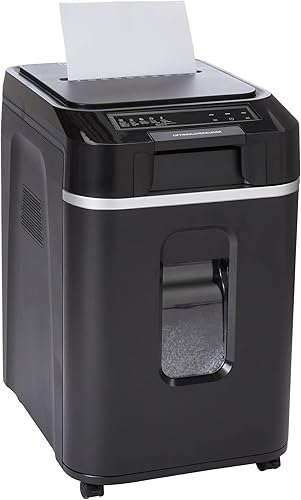
Amazon Basics 200-Sheet Auto-Feed Cross-Cut Shredder: Best for staple-heavy paper stacks
- 200-sheet auto-feed capacity
- P-4 cross-cut
- 60 minutes in auto mode
- 8.5-gallon bin
Fits offices that want large auto-feed batches without removing staples and value clear status indicators.
Pros
- Staples don't need removal
- Largest bin of these 3 models
- Auto reverse and separate Forward and Reverse controls
- Indicators identify feed, bin, door and heat issues
Cons
- Longer paper pieces than either Bonsaii
- Manual feed capacity is 10 sheets
- Requires a 45-minute cooldown after its run-time limit
Amazon Basics is useful when removing staples would add work to a large paper pile. It permits staples without removal and includes indicators for feed errors, a full bin, an open door, overload and overheating.
Its controls also provide separate Forward and Reverse settings alongside Auto/On and Off. Those controls help you respond to a feed issue using the prescribed clearing steps.
The trade-off is a smaller manual pass capacity of 10 sheets and a 10-minute manual run time. It requires a 45-minute cooldown after reaching the operating limit, so skip it if long manual sessions drive your choice.
For more choices within the brand, see our guide to Bonsaii paper shredders. Compare the work pattern first, then the tray size and bin.
How should you set it up and load the first batch?
Set the shredder on a level floor with clear loading and bin access. Read the operating instructions before filling the tray, especially the rules for paper preparation and cooling.
Choose an outlet location that keeps the cord out of walking paths. Keep the feed area away from loose clothing, dangling cords and places where children or pets can reach it.
Make sure the basket is seated correctly before starting. Begin with a small, neatly aligned stack of suitable paper so you can learn the loading steps before filling the tray.
Square the edges and remove folded corners or loose objects. Don't press down on an overfilled tray or force a stack into place.
Plan for sound as well as space. Bonsaii gives an operating noise figure of no more than 58 dB, but that doesn't make it silent beside a call desk.
For shared use, place a short approved-materials note nearby. Clear feed instructions can prevent coworkers from treating the tray as a general waste opening.
What care keeps batch shredding practical?
Empty the bin, lubricate as directed and respect cooling periods. A large tray saves effort only when the machine is ready for the next load.
Bonsaii estimates that the main model's basket holds roughly 700 sheets of shredded paper. Use that as a planning estimate, since paper thickness and how the pieces settle affect usable space.
Check the basket before loading another large batch. Don't pack shredded paper down toward the cutting area to delay emptying.
The main Bonsaii includes 12 lubricant sheets. Follow its manual for their use and frequency rather than treating the number supplied as a maintenance schedule.
Our comparison of shredder oil and lubricant sheets explains the practical differences between those methods. Use only a lubricant and application method approved for the machine.
Unplug before cleaning accessible scraps or reaching near the cutters. Keep aerosol sprays away from the shredder, and never use improvised tools around an energized cutting mechanism.
The main Bonsaii enters sleep mode after 10 minutes of inactivity. That helps during gaps between jobs, but sleep mode doesn't replace unplugging for cleaning.
Which common mistakes should you avoid?
Avoid overloading, mixing materials and restarting too soon. These habits can turn a planned batch job into repeated stops.
- Treating capacity as a target for every load: Reduce the stack when paper is creased or feeding poorly instead of forcing the maximum.
- Confusing letter and legal paper: The main Bonsaii's automatic tray is specified for letter-size sheets, so sort longer documents separately.
- Switching modes to avoid cooling: Follow the cooling directions rather than assuming another slot gives the motor a fresh operating allowance.
- Ignoring a nearly full basket: Make room before starting a large stack so shredded paper can fall freely.
- Repeatedly forcing a stalled feed: Stop and follow the clearing procedure instead of pushing more paper into the opening.
If paper stalls, use the manual's controls and clearing steps. Our guide to how to clear a paper shredder jam explains the process without reaching into a powered machine.
If you're still deciding between an automatic tray and a conventional model, the complete paper shredder buying guide helps match the feed system to your daily routine.
Should you choose the Bonsaii 200-sheet auto feed paper shredder?
Choose the Bonsaii 200-sheet auto feed paper shredder if large routine stacks and extended manual work both matter. Before ordering, confirm that your automatic batches use compatible paper and that the floor location allows easy loading and emptying.
Pick the smaller Bonsaii for weekly home-office piles with time between sessions. Choose Amazon Basics for staple-heavy stacks if its shorter manual allowance fits your work.
For occasional handfuls of paper, start with a smaller machine rather than buying around a rare cleanup. Compare the best auto-feed paper shredders if your normal workload falls between these choices.
Frequently asked questions
How many sheets can the Bonsaii 200-sheet shredder handle at once?
The auto-feed tray accepts up to 200 sheets, while the manual slot accepts up to 12 sheets per pass. The automatic capacity applies to letter-size paper at 20 lb, 75 gsm.
Keep specialty items out of that tray and use the manual slot only for materials the instructions allow.
Is the Bonsaii 200-sheet shredder micro-cut?
Yes, it produces 4 x 12 mm micro-cut pieces and has a P-4 security level. The smaller Bonsaii here produces the same cut size.
Choose between those models by workload, space and run time, and confirm that P-4 meets any document disposal rules your workplace follows.
How long can the Bonsaii 200-sheet shredder run?
Bonsaii specifies up to 60 minutes of continuous operation in auto-feed mode and up to 30 minutes in manual mode. Those limits describe operating time, not how long a full tray takes to finish.
Follow the manual's cooling directions rather than switching modes to extend a session.
Can the Bonsaii 200-sheet shredder shred credit cards?
Yes, its manual mode accepts credit cards, along with staples, paper clips and paper. The auto-feed tray is reserved for compatible letter-size sheets.
Check the manual for card restrictions and feeding directions, and don't assume that permission to shred ordinary cards includes metal cards or other rigid materials.