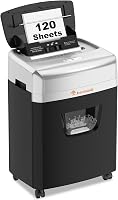
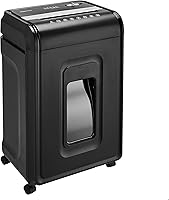
Bonsaii Micro Cut Shredder Review: Worth It? (October 2026)
The Bonsaii micro cut shredder C233-B suits regular paper batches, with a 120-sheet automatic tray and the largest bin of these 3 choices. Choose the Aurora AU110MB for tighter floor space or the AU120MB for an Aurora with matching automatic capacity.
On this page (9 sections)
- The Bonsaii micro cut shredder at a glance
- What do the feed limits and run times mean?
- What can go through the Bonsaii's automatic tray?
- Is P-4 micro-cut security enough for your records?
- Which Aurora alternative should you choose?
- How much room does the Bonsaii need?
- How should you set up the first paper batch?
- How do you care for it and avoid common jams?
- Should you buy this Bonsaii micro cut shredder?
The Bonsaii micro cut shredder C233-B is a strong fit for regular paper clear-outs when you want automatic feeding and a larger collection bin. It makes more sense for a weekly stack of records than for someone who shreds only a few letters.
Its main trade-off is the cooling schedule: this is a batch machine, not an all-day disposal station. Choose it for a home office with time between jobs, and consider the smaller Aurora AU110MB if floor space is your first concern.
The Bonsaii micro cut shredder at a glance
The Bonsaii offers the most bin space and highest manual sheet capacity of these 3 models. That combination suits a desk where paper stacks build up alongside occasional mail and card disposal.
Bonsaii 120-Sheet Auto-Feed Micro-Cut Shredder: Best for weekly paper batches

- 120-sheet automatic paper feed
- 12-sheet manual paper feed
- P-4 micro-cut security
- 5.9-gallon pullout bin with casters
Choose the Bonsaii for regular paper clear-outs and fewer bin-emptying breaks than the smaller bins here allow. Its separate manual feed handles small paper jobs and permitted nonpaper materials.
Pros
- Largest bin of these 3 models
- Highest manual sheet capacity here
- Separate automatic and manual feeds
- Casters for moving between work areas
Cons
- Automatic tray accepts paper only
- Manual run limit is shorter than automatic
- Needs 60 minutes off after reaching either run limit
Automatic feeding saves you from standing at the slot with each small bundle. You'll still need to sort the papers first, check that they feed correctly and return to empty the bin.
The advantage is strongest when most of your pile is ordinary paper. If every batch contains envelopes, cards and fastened documents that need separate handling, preparation takes a larger share of the job.
Who should buy the Bonsaii micro cut shredder?
Buy it if you save shredding for a regular clear-out and can let the machine cool before the next session. Its larger bin also helps when you would rather empty one collection basket after a job than interrupt it repeatedly.
Skip it if you need long stretches of manual shredding or have nowhere to leave a floor-standing machine. For occasional letters, a smaller manual-feed shredder may fit your routine better.
If your usual stack is larger than its tray can hold, read the Bonsaii 200-sheet auto-feed review. Compare capacity against your normal workload, rather than buying around a one-time archive cleanup.
What do the feed limits and run times mean?
The Bonsaii's automatic tray holds up to 120 sheets, but its manual slot accepts up to 12 paper sheets at once. Automatic capacity describes the loaded stack, not a bundle pushed through the manual opening.
| Mode | Paper capacity | Maximum run | Rest after reaching the limit |
|---|---|---|---|
| Automatic | 120 sheets in the tray | 30 minutes | 60 minutes off |
| Manual | 12 sheets per feed | 10 minutes | 60 minutes off |
The shorter manual limit matters if you mainly shred incoming mail a bundle at a time. Buying an automatic model won't give those manual jobs the longer automatic operating window.
Don't switch modes to bypass cooling. Plan around the limit of the mode you're using, and follow any warning or stop instructions before that limit is reached.
A full tray also doesn't promise that your entire job will finish without attention. Paper condition, correct loading and available bin space all affect how smoothly a batch moves through.
For a large clear-out, sort documents into ready-to-shred piles before starting. Keep documents you need to retain in a separate place so you don't make disposal decisions beside a running feed slot.
What can go through the Bonsaii's automatic tray?
Put paper only in the automatic tray, with cards and fastened materials separated for manual handling. The manual feed supports paper, mail, nonmetallic credit cards, clips and staples.
That permission doesn't mean a mixed handful belongs in the slot. Open mail, separate its contents and remove anything outside the allowed materials before feeding it.
The paper-sheet limit isn't a card limit. Use the operating instructions for card quantity, orientation and placement, and keep metallic credit cards out entirely.
Flatten folds and straighten uneven stacks before loading. Don't force thick envelopes, adhesive bundles, laminated items or unfamiliar materials through simply because the machine accepts ordinary paper.
For routine use, keep 2 sorting piles: plain paper for the tray and permitted items that need manual handling. Put anything uncertain aside until you've checked the instructions.
Is P-4 micro-cut security enough for your records?
P-4 is the security class to assess, rather than relying on the word “micro-cut” alone. The Bonsaii cuts paper into 4 x 12 mm pieces, matching the Aurora AU120MB's particle size.
The AU110MB makes slightly longer 4 x 14 mm pieces, but all 3 models share the same P-4 class. The difference doesn't give the Bonsaii a higher security classification.
For home paperwork, choose according to the sensitivity of what you discard and any requirements that apply. For workplace records, confirm your organization's disposal policy before selecting a machine.
Our paper shredder security levels guide explains the classes. If you're still choosing between feed types, security levels and machine sizes, start with the complete paper shredder buying guide.
Security also depends on your routine. Keep unshredded records away from shared waste bins, and don't leave a loaded tray of sensitive documents accessible to other people.
Which Aurora alternative should you choose?
Choose the Aurora AU110MB for limited floor space or the AU120MB if you prefer Aurora with the Bonsaii's automatic stack capacity. Neither offers as much collection space as the Bonsaii.
| Model | Main reason to choose it | Main reason to skip it |
|---|---|---|
| Bonsaii C233-B | Larger bin for regular paper batches | Frequent manual work runs into a shorter operating limit |
| Aurora AU110MB | Smaller dimensions for a tight office | Smaller basket means less room for shredded paper |
| Aurora AU120MB | Aurora option with a larger tray than the AU110MB | Gives up bin space and manual capacity against the Bonsaii |
Aurora AU110MB: choose it when space comes first
The AU110MB fits a smaller area, measuring 8.7 in deep, 13.4 in wide and 18.8 in high. Its automatic tray holds 110 sheets, its manual feed accepts 10 sheets, and its pullout basket holds 4 gallons.
Aurora specifies a 30-minute continuous run. It also includes casters, jam-prevention automatic reverse, overload protection and lights for conditions such as a full bin, open door or feed error.
Buy it for a small home office where the machine needs to fit beside a desk. Skip it if your main goal is fewer emptying breaks during regular clear-outs.
Aurora AU120MB: choose it for a larger Aurora batch machine
The AU120MB provides a 120-sheet automatic tray and 5-gallon pullout bin, with a 10-sheet manual feed. Aurora specifies a 30-minute continuous run, automatic reverse, overload protection and status lights.
It suits someone who prefers Aurora but finds the AU110MB's basket too small. Against the Bonsaii, it offers matching automatic capacity and cut size with less bin space and a lower manual sheet limit.
Skip it if you're choosing solely for maximum capacity among these options. The Bonsaii has the stronger combination for that use.
For a wider brand comparison, see the Bonsaii and Aurora shredder matchup. Brand preference can narrow the search, but feed limits and placement should decide the model.
How much room does the Bonsaii need?
Allow space for the cabinet, the pullout bin and access to the cover. The Bonsaii measures 10.35 in deep, 14.45 in wide and 19.96 in high, before you account for that working clearance.
Its 5.9-gallon bin has a transparent window, and shredding stops when the bin is about 80% full. Expect to empty it before the container is filled to the rim.
The casters help you reposition it, but choose a stable, level working spot. Don't plan on pulling it across a walkway every time you need to dispose of a document.
Bonsaii gives a noise figure of 63 dB. Place it away from your usual call position if you expect to shred during the workday, and plan larger batches between meetings.
Before ordering, measure the route the bin will take when you remove it. A machine can fit beneath a desk while still being awkward to empty there.
How should you set up the first paper batch?
Start with a small, prepared paper load so you can learn the controls and feed behavior before filling the tray. Read the operating instructions for assembly, loading and permitted paper types first.
- Remove transport packaging and fit the bin and any required parts as directed.
- Place the shredder where its openings stay clear and its power cord won't cross a walking path.
- Locate the stop, reverse and warning controls before feeding paper.
- Sort a small stack, removing fasteners and nonpaper items from the automatic load.
- Load it in the required orientation and check that feeding begins correctly.
- Empty the bin and address any warning before starting a larger job.
Keep hair, loose sleeves, jewelry and cords away from the feed opening. Position the machine where children and pets can't reach it during use.
After that first batch, decide where the unsorted pile, ready paper and retained records will sit. A clear sorting area reduces accidental shredding and makes automatic feeding more useful.
How do you care for it and avoid common jams?
Use properly prepared loads, empty the bin promptly and follow Bonsaii's lubrication instructions. Jam prevention starts before paper reaches the cutters.
Don't treat maximum sheet capacity as a target for every manual bundle. Folded, creased or uneven paper is easier to manage in smaller amounts.
Avoid topping up a moving stack unless the instructions allow it. Let the feed work without pressing down on paper or pushing scraps toward the opening.
If feeding stops, check the bin and any warning indicators before adding more paper. Continuing to load a machine that needs emptying or cooling creates extra work.
Use the prescribed reverse procedure for a blockage. If you need to reach inside or remove scraps, switch off and unplug the shredder first, then follow the clearing instructions.
Our guide explains how to clear a paper shredder jam. For repeat blockages, why paper shredders keep jamming helps you work through load size, paper condition and maintenance.
Don't spray or store aerosol products in or around the shredder. Use only a lubricant and method allowed by Bonsaii, rather than substituting household sprays.
See how to oil a paper shredder and oil versus lubricant sheets for general care guidance. Follow the model's instructions for the actual schedule.
Empty the basket before compacted shreds interfere with operation. Don't push a hand up toward the cutting area to make room.
Check local recycling rules before combining paper shreds with card fragments. Our guide to what to do with shredded paper covers disposal and reuse options.
Should you buy this Bonsaii micro cut shredder?
Buy the Bonsaii micro cut shredder for regular paper batches and its larger bin, provided your schedule leaves room for cooling. It fits a routine of sorting first, loading plain paper and handling occasional permitted items separately.
Choose the AU110MB when a smaller cabinet matters most. Pick the AU120MB if you prefer Aurora and want more batch and bin capacity than the AU110MB provides.
Skip all 3 if your work requires extended operation without cooling breaks or a higher security class. Compare our auto-feed shredder picks against your normal batch size before committing.
Frequently asked questions
How many sheets can the Bonsaii shred at once?
The Bonsaii C233-B accepts up to 120 sheets in its automatic paper tray or up to 12 sheets through manual feed. Those are separate limits, not interchangeable capacities.
Sort out cards, clips and stapled bundles before loading the automatic tray, and follow the manual's paper requirements.
What security level is the Bonsaii micro-cut shredder?
The Bonsaii C233-B is a P-4 shredder that cuts paper into 4 x 12 mm pieces. Match that level to your document disposal rules before buying, especially for workplace records.
Our paper shredder security levels guide explains how security classes differ and why the micro-cut label alone isn't enough.
How long can the Bonsaii shred continuously?
The Bonsaii allows 30 minutes of automatic operation or 10 minutes of manual operation, followed by 60 minutes off after reaching either limit. Changing feeds doesn't remove the need for cooling.
Plan large clear-outs in sessions, and stop sooner if the machine signals a problem.
Can the Bonsaii shred credit cards automatically?
No, credit cards belong in the manual feed, and metallic credit cards must stay out of the shredder entirely. The automatic tray accepts paper only.
Follow the operating instructions for card placement and quantity, and see how to oil a paper shredder for general maintenance guidance.