6 Best Paper Shredders for Home Use (October 2026)
The best paper shredders for home use include the Bonsaii 12-Sheet Micro-Cut Shredder for everyday household papers, the Bonsaii 12-Sheet Cross-Cut Shredder for fewer emptying breaks, and the Fellowes 14C10 14-Sheet Cross-Cut Shredder for brief desk sessions.
On this page (7 sections)
- Which paper shredder is best for home use?
- Which shredder handles bigger household batches?
- Do you need a safety lock or a larger bin?
- How should you choose a home paper shredder?
- How should you set up a home shredder?
- How do you keep a shredder working smoothly?
- Which home paper shredder should you choose?
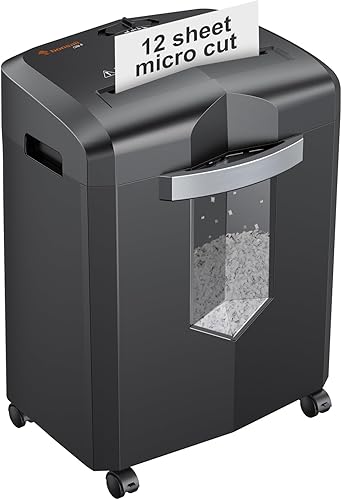
The best paper shredder for home use is the Bonsaii 12-Sheet Micro-Cut Shredder for routine bills, statements and personal records. It combines smaller paper pieces with enough session time for regular household batches.
Choose a different model when your main problem is a backlog, frequent bin emptying or controlling access between uses. Those needs point toward a longer-running Bonsaii, the larger-bin Amazon Basics or a Fellowes with a safety lock.
Start with the paper you actually discard each week, then account for occasional file cleanouts. A shredder that fits that routine is more useful than one chosen only for its maximum sheet count.
We compared these models by cut size, workload, bin space and controls. Our paper shredder buying guide covers the wider category if you're still deciding what kind of machine you need.
Our picks at a glance
-
1
 Best for everyday household papers
Bonsaii 12-Sheet Micro-Cut Shredder
8.9/10 our score
See it on Amazon -
2
 Best for fewer emptying breaks
Bonsaii 12-Sheet Cross-Cut Shredder
8.4/10 our score
See it on Amazon -
3
 Best for brief desk sessions
Fellowes 14C10 14-Sheet Cross-Cut Shredder
8.1/10 our score
See it on Amazon
- 4
 Check it
Bonsaii 15-Sheet Cross-Cut Shredder
Best for accumulated paper piles - 5
 Check it
Fellowes Powershred 12-Sheet Cross-Cut Shredder
Best for shared family workspaces - 6
 Check it
Amazon Basics 12-Sheet High-Security Micro-Cut Shredder
Best for busy household paperwork
Which paper shredder is best for home use?
The Bonsaii micro-cut model is the best starting point for regular home paperwork. Move to another pick only when it solves a clear problem, such as a short run time, a bin that fills too quickly or the need to disable the controls.
All six models meet P-4, but their paper pieces, session limits and handling features differ. A higher sheet count helps you feed a stack in fewer passes; it doesn't remove the need for cooling breaks.
Use the comparison table to narrow the choice, then read the product sections for the trade-offs that affect daily use.
| Product | Best for | Cut type | Sheet capacity | Bin capacity | Our score |
|---|---|---|---|---|---|
| Bonsaii 12-Sheet Micro-Cut Shredder | everyday household papers | Micro cut, P-4 | 12 sheets | 4.2 gallons | 8.9 |
| Bonsaii 12-Sheet Cross-Cut Shredder | fewer emptying breaks | Cross cut, P-4 | 12 sheets | 5.5 gallons | 8.4 |
| Fellowes 14C10 14-Sheet Cross-Cut Shredder | brief desk sessions | Cross cut, P-4 | 14 sheets | 5 gallons | 8.1 |
| Bonsaii 15-Sheet Cross-Cut Shredder | accumulated paper piles | Cross cut, P-4 | 15 sheets | 5 gallons | 8.0 |
| Fellowes Powershred 12-Sheet Cross-Cut Shredder | shared family workspaces | Cross cut, P-4 | 12 sheets | 5 gallons | 7.8 |
| Amazon Basics 12-Sheet High-Security Micro-Cut Shredder | busy household paperwork | Micro cut, P-4 | 12 sheets | 6 gallons | 7.6 |
Best paper shredder for home: smaller pieces for personal records
The Bonsaii micro-cut model makes 5 x 12 mm paper pieces, smaller than those from the cross-cut picks here. That suits households that want bills and personal records broken into shorter fragments.
Read what a micro-cut shredder is for the cut-type basics, or our P-4 vs P-5 security guide if you need to choose a security level.
Bonsaii 12-Sheet Micro-Cut Shredder: Best for everyday household papers
- P-4 micro-cut pieces
- 12 sheets per pass
- Up to 20 minutes of continuous shredding
- 4.2-gallon pullout bin with casters
A good fit for routine bills, statements and personal records when smaller paper pieces matter. The smaller bin favors frequent, manageable batches.
Pros
- Micro-cut P-4 output
- Up to 20 minutes of continuous use
- Casters and visible bin window
Cons
- Smallest bin in this group
- Lower sheet limit than the 14- and 15-sheet picks
The Bonsaii 12-Sheet Micro-Cut Shredder suits a household that shreds regularly rather than saving everything for one annual clearout. Its 12-sheet feed limit and up to 20-minute run time give you room to work through modest stacks without feeding every page alone.
The 4.2-gallon pullout bin is the smallest here, so choose it for manageable batches rather than maximum space for shreds. A visible window lets you check the fill level before paper backs up toward the cutters.
It accepts credit cards, staples, paper clips and CDs as well as paper. Follow the separate feed instructions for each material instead of putting mixed items through together.
Automatic start/stop keeps routine feeding simple, while overload protection helps guard against an overfilled feed. Neither feature makes it sensible to force thick or crumpled bundles into the slot.
Buy this model if smaller fragments are your main priority and emptying the bin is an easy part of your routine. Skip it if your current shredder's biggest annoyance is frequent emptying; the Amazon Basics offers more room while retaining micro-cut output.
Which shredder handles bigger household batches?
The Bonsaii 15-sheet model is the strongest choice here for long file-clearing sessions. The next three picks solve different batch problems: more bin space, thicker feeds during short sessions or more time before a cooling break.
Bonsaii 12-Sheet Cross-Cut Shredder: Best for fewer emptying breaks
- P-4 cross-cut output
- 12 sheets per pass
- Up to 15 minutes of continuous shredding
- 5.5-gallon pullout bin
Choose this for short household sessions when you want more room for shreds. Its pullout bin is the largest among the cross-cut models here.
Pros
- 5.5-gallon pullout bin
- Stops when the bin is removed
- Auto start/stop and manual reverse
Cons
- Shorter run time than the 20- and 40-minute picks
- Cannot shred metallic credit cards
The Bonsaii 12-Sheet Cross-Cut Shredder suits households that finish shredding in short sessions but want fewer bin-emptying stops. Its 5.5-gallon pullout bin gives it more room for shreds than the other cross-cut picks.
It handles up to 12 sheets of Letter-size, 20-pound paper per pass and runs continuously for up to 15 minutes. That combination fits regular mail and record disposal better than a lengthy catch-up session.
Its P-4 cut produces 5 x 25 mm pieces. Choose this model because the bin and session limit fit your routine, rather than expecting the same fragment size as the top micro-cut pick.
Auto start/stop and manual reverse provide the basic controls you'll use most often. The machine also stops when you pull out the wastebasket.
It accepts CDs, credit cards and staples, but metallic credit cards must stay out. Keep those separate from ordinary plastic cards before you begin.
Buy it if emptying interrupts otherwise short batches. Skip it if you routinely reach a shredder's thermal limit before finishing, since a larger bin won't solve that problem.
Fellowes 14C10 14-Sheet Cross-Cut Shredder: Best for brief desk sessions
- 14 sheets per pass
- P-4 cross-cut output
- Up to 10 minutes of continuous shredding
- 5-gallon pullout bin
A fit for short, regular sessions when a higher sheet limit and a safety lock matter. Skip it for long file cleanouts.
Pros
- 14-sheet capacity
- Safety lock
- Accepts unopened junk mail
Cons
- Shortest continuous run time in this group
- Smaller bin than the 5.5- and 6-gallon picks
The Fellowes 14C10 suits people who shred often and keep sessions brief. Its 14-sheet capacity lets you feed thicker batches, while the safety lock lets you disable the machine when you finish.
The main limit is its run time of up to 10 minutes, the shortest in this group. That makes it a better fit beside a desk for regular disposal than for clearing years of stored paperwork.
Its P-4 cross-cut pieces measure 5/32 x 1-9/16 inches, and the pullout bin holds 5 gallons. Staples, paper clips, credit cards and unopened junk mail are accepted materials.
Even with unopened junk mail support, separate questionable envelopes before feeding them. Thick folds and hidden inserts make a bundle harder to judge than a stack of plain sheets.
Fellowes backs the machine with a 1-year product and service warranty and a 5-year cutter warranty. Keep the distinction in mind: cutter coverage is not the same as coverage for the whole machine.
Choose it for short sessions where the lock and higher feed limit matter. Skip it for long uninterrupted batches, especially if you're comparing it with the longer-running Fellowes below.
Bonsaii 15-Sheet Cross-Cut Shredder: Best for accumulated paper piles
- 15 sheets per pass
- Up to 40 minutes of continuous shredding
- 5-gallon pullout bin
- Casters and auto start/stop/reverse
The strongest match here for longer file-clearing sessions, with the highest sheet limit and longest stated run time. Allow for a lengthy cooling break if overheating protection activates.
Pros
- Highest sheet capacity in this group
- Longest stated run time in this group
- Overload and overheating indicators
Cons
- 40-minute cool-down if overheating protection activates
- Smaller bin than the 5.5- and 6-gallon picks
The Bonsaii 15-Sheet Cross-Cut Shredder is the clearest match for a backlog of household papers. Its 15-sheet capacity and up to 40-minute continuous run time address both the number of feeds and the length of the job.
It has a 5-gallon pullout bin, a clear fill window and swivel casters. You'll still need to watch the basket during a long session, since a longer-running motor doesn't create more room for shreds.
Its P-4 paper cut matches the shorter Bonsaii cross-cut model's fragment size. It also accepts CDs, credit cards, mail and staples.
Auto start/stop/reverse and overload and overheating lights help you respond when the feed or motor needs attention. Stop adding paper when a warning appears rather than trying to finish the last handful.
Bonsaii specifies 40 minutes of cooling if overheating protection activates. Plan that break into a major clearout, especially if more than one person will use the machine.
Buy it for occasional large jobs or sustained household paperwork. Skip it if you need a safety lock, which is a reason to favor one of the Fellowes models instead.
Do you need a safety lock or a larger bin?
Choose a safety lock when disabling the machine between uses is a priority, and choose more bin space when emptying is your main interruption. A lock supplements careful placement and supervision; it doesn't make an accessible shredder suitable for children to use.
Fellowes Powershred 12-Sheet Cross-Cut Shredder: Best for shared family workspaces
- P-4 cross-cut output
- 12 sheets per pass
- Up to 20 minutes of continuous shredding
- 5-gallon pullout bin
Choose this when you want a safety lock and more session time than the Fellowes 14C10 provides. It favors steady feeding over thicker stacks.
Pros
- Safety lock
- Up to 20 minutes of continuous use
- 5-gallon pullout bin
Cons
- Lower sheet limit than the 14- and 15-sheet picks
- Needs a cool-down after its maximum run
The Fellowes Powershred 12-Sheet Cross-Cut Shredder suits a shared family workspace where you want to disable the controls after each session. It also gives you more continuous working time than the Fellowes 14C10.
Its 12-sheet capacity and up to 20-minute run time favor steady feeding over thicker handfuls. That trade-off makes sense when you prefer working through a sorted pile without rushing.
The machine produces P-4 cross-cut pieces and has a 5-gallon pullout bin. It accepts staples, paper clips, credit cards and unopened junk mail along with paper.
Choose this Fellowes if your usual stack takes longer to process than a brief desk session. The lower feed limit matters less when you're sorting papers as you go and feeding smaller batches.
The safety lock is useful only if you make a habit of engaging it. Keep the unit and cord out of children's reach, and unplug it before cleaning or inspecting the cutter area.
Skip it if the top priority is processing the thickest possible feeds or producing micro-cut fragments. Its strongest reason to buy is the combination of a lock and a longer session window.
Amazon Basics 12-Sheet High-Security Micro-Cut Shredder: Best for busy household paperwork
- P-4 micro-cut output
- 12 sheets per pass
- Up to 20 minutes of run time
- 6-gallon pullout bin with casters
A larger-bin alternative for households that want micro-cut paper pieces and clear status lights. Plan around equal shredding and cooling periods at its maximum run time.
Pros
- Largest bin in this group
- P-4 micro-cut output
- Casters and status indicators
Cons
- 20-minute cool-down after its maximum run
- Lower sheet limit than the 14- and 15-sheet picks
The Amazon Basics 12-Sheet High-Security Micro-Cut Shredder suits households that want smaller fragments without choosing the smallest basket. Its 6-gallon pullout bin is the largest here, and casters help you reposition it.
It produces P-4 micro-cut pieces measuring 5.1 x 12.7 mm. The feed accepts up to 12 sheets of 20-pound paper, including staples and small paper clips.
Its maximum run time is 20 minutes, followed by a 20-minute cool-down. Treat that as a work-and-rest cycle when planning a file cleanout.
Power/auto, forward and reverse buttons sit alongside indicators for overload, overheating, a full bin and an open door. Those separate signals help you check the right cause when the machine stops.
It also accepts CDs, DVDs and credit cards one at a time. Use the correct slot and method for each item, rather than assuming all openings produce the same result.
Buy it when more bin room is worth setting aside space for the unit and its drawer. Skip it if you need longer continuous sessions, since the larger basket doesn't extend the motor's run limit.
How should you choose a home paper shredder?
Choose by document sensitivity, normal batch size and available space, in that order. Then check the controls and accepted materials that will make your routine easier.
Is micro-cut or cross-cut better for home papers?
Choose micro-cut when you want smaller paper fragments, but compare the security level and actual cut dimensions rather than relying on the name alone. Both cut types in this roundup meet P-4.
For routine household papers, that gives you a practical starting point. If a workplace, client or document policy requires a specific destruction standard, choose to that requirement instead.
Our micro-cut vs cross-cut comparison explains the difference in more detail. Use our guide to documents to shred at home to separate sensitive papers from ordinary recycling.
Shredding everything wastes time and bin space. Focus on papers that reveal personal, financial or account details, while keeping records you still need in secure storage.
How much sheet capacity do you need?
Choose enough capacity for your usual handful of papers, then feed below the maximum when paper is thick, folded or creased. Sheet limits depend on the paper conditions specified by the manufacturer.
A folded sheet adds layers, and an envelope is not equal to one flat page. Glossy inserts and mixed paper weights also make a bundle harder to judge.
For a small weekly pile, a modest feed limit can be enough. For a large stack, a higher limit reduces passes, but run time may still decide how soon the job finishes.
Our guide to shredder sheet capacity explains how to translate a sheet count into a realistic household workload.
Does run time matter more than sheet capacity?
Run time matters most when you save papers for one large session. Sheet capacity matters more when you want to feed thicker handfuls during short, frequent sessions.
Think about the whole job, including sorting, feeding, emptying and cooling. A higher sheet limit can lose its advantage if the machine needs a break before you finish.
Sort a backlog before switching the shredder on so you can use its working window for feeding. Keep papers you need to retain well away from the discard pile.
If repeated manual feeding is the part you want to avoid, compare the different workflow in our auto-feed shredder guide. None of these six is an auto-feed choice.
What bin size is practical?
Choose a bin you can empty easily in the space you have. More capacity helps with paper volume, but access to the drawer matters as much as fitting the machine beside a desk.
Measure the planned spot and leave clearance in front for removal. Check that a chair, cabinet door or wall won't force you to move the shredder every time you empty it.
Don't compare gallon capacity directly with a claimed number of shredded sheets. Paper weight, cut size and how loosely fragments settle all affect how quickly a basket fills.
Our guide to shredder bags explains when a compatible liner can simplify cleanup. A bag must not block the drawer, sensors or safety mechanism.
How should you set up a home shredder?
Set it on a stable, level surface with clear access to the bin and controls. Keep the feed opening away from children, pets, loose cords, curtains and anything that could fall into it.
Read the manual before plugging it in, especially the sections on accepted materials, cooling and lubrication. Confirm that the bin is seated properly and remove any packaging around the unit.
Leave ventilation openings clear rather than pushing the machine tightly into an enclosed cabinet. Route its power cord where a chair wheel or passing foot won't catch it.
Start with a small feed of plain paper to learn the controls and confirm that shreds enter the basket. Check where reverse, power and any safety lock are before processing a full pile.
Make 3 separate stacks: keep, shred and recycle. Review both sides of each document before feeding it, since reverse cannot restore paper once the cutters have destroyed it.
Keep loose hair, necklaces, ties and flowing sleeves away from the opening. Stay with the machine while it runs, and switch it off when the session is over.
How do you keep a shredder working smoothly?
Use small, straight feeds, timely bin emptying and the manual's care routine to reduce avoidable stoppages. Don't rely on overload protection or reverse to make overfeeding harmless.
Prevent jams before reaching for reverse
Let one feed clear before adding the next, and guide paper into the slot without pushing it through. Remove binder clips, thick inserts and any material the manual doesn't approve.
Empty the basket before shreds build up near the outlet. Switch off and unplug the unit before clearing loose paper around the bin or inspecting underneath the cutter head.
If paper stalls, stop feeding and follow the model's reverse procedure. Repeatedly adding paper or rapidly switching directions can turn a small blockage into a tighter one.
Disconnect power before removing trapped paper by hand, and keep fingers and tools away from the cutters. Our guide to clearing a shredder jam walks through the process.
Oil only as the manual directs
Use the lubricant and method approved for your model. Cooking oil, general household sprays and aerosol lubricants don't belong in the feed slot.
The correct care interval depends on the machine and how much you shred. Follow its instructions rather than applying one schedule to every cross-cut or micro-cut model.
See our guide to oiling a paper shredder for the basic methods. Unplug before cleaning accessible surfaces, and never reach into the cutter assembly to spread oil.
Respect heat warnings and material limits
Allow the full required cooling period after reaching the run limit or triggering thermal protection. A motor restarting does not by itself confirm that the prescribed break is complete.
Feed cards and discs only through the approved opening and in the permitted quantity. Acceptance of one material, such as staples, doesn't imply approval for every metal fastener.
Keep shredded plastic and discs separate from paper when your local disposal rules require it. Check local recycling guidance before putting loose shredded paper into a collection bin.
Which home paper shredder should you choose?
The best paper shredder for home is the one that solves your main workload problem. Choose the Bonsaii 12-sheet micro-cut model for regular personal paperwork, or Amazon Basics if you want similar small fragments with more bin room.
Pick the Bonsaii 12-sheet cross-cut model when short batches and fewer emptying breaks suit your routine. Choose the 15-sheet Bonsaii when accumulated files make session length the deciding factor.
For a safety lock, choose the Fellowes 14C10 for brief sessions with thicker feeds, or the Fellowes Powershred for steadier, longer sessions. Neither choice removes the need for careful placement and safe habits.
Before ordering, check the space for the machine and its open bin, then match the manual's feed rules to what you discard. For more choices aimed at a dedicated workspace, see our best paper shredders for a home office.
Our top 3 picks at a glance
-
1
Best for everyday household papers
Bonsaii 12-Sheet Micro-Cut Shredder
8.9/10 our score
See it on Amazon -
2
Best for fewer emptying breaks
Bonsaii 12-Sheet Cross-Cut Shredder
8.4/10 our score
See it on Amazon -
3
Best for brief desk sessions
Fellowes 14C10 14-Sheet Cross-Cut Shredder
8.1/10 our score
See it on Amazon
Frequently asked questions
What type of paper shredder is best for home use?
A P-4 cross-cut or micro-cut shredder is a practical starting point for routine household documents. Choose smaller paper pieces for personal records, then match the run time and bin size to your routine.
For documents covered by a specific destruction policy, follow that policy's security requirements.
Is a micro-cut shredder worth it for home use?
A micro-cut shredder is worth considering for sensitive personal papers because the micro-cut models here make smaller pieces than the cross-cut choices. Both types in this roundup meet P-4, so micro-cut does not mean a higher security level.
Choose by actual cut size, workload and bin space.
How many sheets should a home shredder handle?
A 12-sheet model is a useful starting point for regular household paperwork. A higher limit helps with thicker batches, but long cleanouts also need enough run time.
Count folded paper as multiple layers, stay within the manual's paper-weight limit and use smaller feeds when sheets are thick or creased.
How long can you run a home paper shredder?
These models have stated continuous run times of 10 to 40 minutes, with cooling required afterward. Choose a run time that covers your normal batch rather than relying on the sheet limit alone.
Stop feeding if the machine signals overheating, then allow the full cooling period required by its manual.